Installing the RBLN NPU Operator on OpenShift
Install the NPU Operator through OLM and create RBLNClusterPolicy and RBLNDriver resources. This example uses Device Plugin. For workloads, follow the NPU Pod tutorial.
Prerequisites
- An OpenShift Container Platform cluster covered by the support matrix
- At least one worker node equipped with an RBLN NPU
- An installed Node Feature Discovery (NFD) Operator
- An RBLN Portal account with access to driver and RSMD images
Verify RBLN NPU detection
Rebellions NPUs use PCI vendor ID 1eff. Query both label formats because NFD configuration determines whether the PCI class is included.
Detection is working if either command lists a worker node equipped with an NPU. If no nodes are listed, check that NFD is working correctly and that the host detects the NPU.
Configuring kernel boot parameters
Apply the kernel parameters for the target hardware through MachineConfig.
Creating an image pull secret
Create the rbln-system namespace and store your RBLN Portal account credentials in the drivercred image pull secret. The driver and RSMD use this secret.
Installing the RBLN NPU Operator
Use either the web console or CLI to install through OLM. Follow one installation method.
Installing via the web console
- Navigate to Operators > OperatorHub in the OpenShift web console.
- Select All Projects.
- Search for RBLN Operator > RBLN NPU Operator.
- On the Install Operator page, configure the following options:
- Update channel:
stable - Version: The release to install. Check the catalog and support matrix.
- Installed Namespace:
rbln-system(recommended)
- Update channel:
- Click Install.
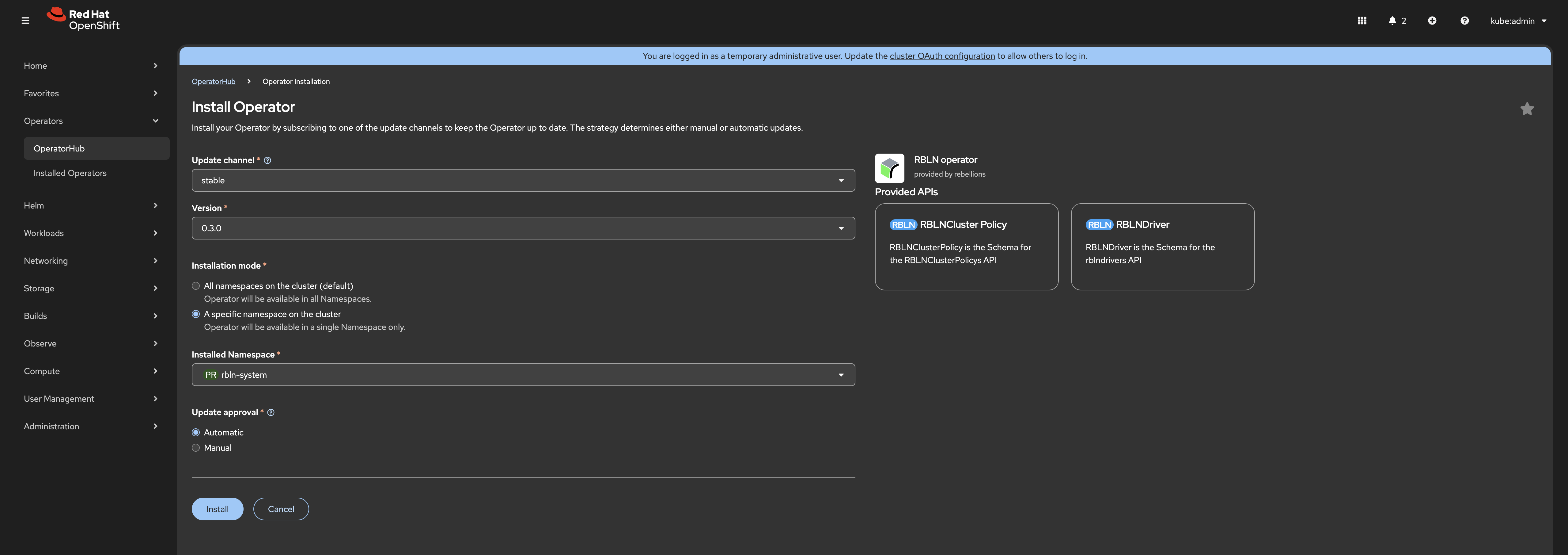
After installing through the web console, continue with the Operator readiness checks.
Installing via the CLI
Look up the channel and CSV in the cluster catalog. The Automatic setting also approves future OLM updates in that channel.
Both values must be present before you apply the Subscription. If either is missing, check the package manifest and catalog.
Check Operator readiness
After installation, list the Subscriptions. The CLI example uses rbln-npu-operator. If the web console created a different name, set SUBSCRIPTION to that name.
Continue only when the CSV reaches Succeeded. If installation fails, run oc describe subscription "$SUBSCRIPTION" -n rbln-system and inspect the InstallPlan.
The following steps read API fields and images for the current Operator version from its CSV. Follow the same steps after a web console installation.
Create the RBLNClusterPolicy Instance
RBLNClusterPolicy defines the node components and their images. Read the example RBLNClusterPolicy instance from the CSV and configure it to use the Device Plugin. Keep the API version and component images from that CSV.
Create the RBLNClusterPolicy instance.
Create the RBLNDriver Instance
RBLNDriver deploys the driver on eligible nodes. Extract its example and inspect the image and credential fields.
Check the driver fields before applying:
Field in driver.json | Check |
|---|---|
spec.registry, spec.image, spec.version | The image specified by these fields must exist and support the worker's NPU family, OS and kernel. See driver image selection. |
spec.imagePullSecrets | Includes drivercred, created during preparation. |
spec.smd.registry, spec.smd.image | The RSMD repository must be accessible. The image uses the same version tag as the driver. |
Create the RBLNDriver instance.
Verify Installation
After OLM installation completes, wait for the RBLNDriver and RBLNClusterPolicy instances to become ready. The examples show healthy states; names and node counts vary by environment.
$ oc get rblnclusterpolicy "$POLICY" \
  -o 'custom-columns=NAME:.metadata.name,STATE:.status.state'
NAME                  STATE
rbln-cluster-policy   ready

$ oc get rblndriver "$DRIVER" \
  -o 'custom-columns=NAME:.metadata.name,STATE:.status.state,READY:.status.readyNodes,DESIRED:.status.desiredNodes'
NAME          STATE   READY   DESIRED
rbln-driver   ready   1       1
Confirm both conditions:
- The
RBLNClusterPolicyinstance reportsready. - The
RBLNDriverinstance reportsready.
$ oc get nodes -l rebellions.ai/npu.present=true \
  -o 'custom-columns=NAME:.metadata.name,FAMILY:.metadata.labels.rebellions\.ai/npu\.family,PRODUCT:.metadata.labels.rebellions\.ai/npu\.product,ALLOCATABLE:.status.allocatable.rebellions\.ai/npu'
NAME            FAMILY     PRODUCT     ALLOCATABLE
node-rebel100   rebel100   RBLN-CR13   1
$ oc get nodes -l rebellions.ai/npu.present=true \
  -o 'custom-columns=NAME:.metadata.name,FAMILY:.metadata.labels.rebellions\.ai/npu\.family,PRODUCT:.metadata.labels.rebellions\.ai/npu\.product,ALLOCATABLE:.status.allocatable.rebellions\.ai/npu'
NAME        FAMILY   PRODUCT     ALLOCATABLE
node-atom   atom     RBLN-CA25   4
At least one schedulable worker must provide an NPU.
Run an NPU Pod
Follow Run an NPU Pod with the same OpenShift context.
For removal, follow the OLM steps in Uninstalling the RBLN NPU Operator. For restricted networks, see air-gapped installation.