Getting Started with RBLN Profiler
This section outlines the basic steps for using the RBLN Profiler. It first explains the RBLN Profiler API with a PyTorch BERT model from the RBLN Model Zoo, and then shows how to extract profiling data with optimum-rbln and vllm-rbln.
To use torch.profiler with RBLN PyTorch, see Profiling on Rebel100™.
Prerequisites
Before starting, ensure the following pip packages are installed on your system.
Note
The RBLN Profiler is a feature in the rebel-compiler package. Therefore, it is installed when you install rebel-compiler and does not need to be installed separately.
RBLN Profiler API
The RBLN Profiler works through the runtime API of rebel-compiler, and this API is the foundation of every way to use the RBLN Profiler. This section explains the API with an example that uses rebel-compiler to compile a BERT-base model trained for question answering and extracts profiling data by calling the RBLN Runtime API directly.
The RBLN Profiler API has two roles.
- Choosing what to profile: setting
activate_profiler=Truewhen creating a runtime makes the inference runs of that runtime the target of profiling. The environment variableRBLN_PROFILER=1does the same. - Choosing when to record:
start()anddone()ofrebel.profilermark where the recorded window begins and ends.with profile(...)wraps a section of code with these two calls.
Compile Model
The BERT-base model can be compiled with the following command. When the model compilation is completed, the bert-base.rbln file is created in the directory.
Activate RBLN Profiler
Profile the model by either using the argument activate_profiler=True in rebel.Runtime when creating the runtime module, or setting the environment variable RBLN_PROFILER=1 while running inference. A runtime created with the profiler on loads the profiling information in the compiled model and prepares for profiling; every inference it runs from then on is recorded. A runtime created with the profiler off is not profiled.
-
Using the RBLN Runtime API: set
activate_profiler=Trueto activate the RBLN Profiler. -
Using the environment variable: setting the environment variable
RBLN_PROFILER=1is the same as settingactivate_profiler=Trueon every runtime the process creates, so the model is profiled without code changes.
Either setting is enough on its own. The profiler is on when either one is on, so activate_profiler=False does not turn it off while RBLN_PROFILER=1 is set.
Note
The RBLN Profiler is not available on the asynchronous runtime (rebel.AsyncRuntime).
Extract Profiled Data with Inference
- Generally, you can obtain the profiling data without any additional setting, as shown below. The data the profiler collects is then written to the default path (
./) when the process exits normally: with profile(...)profiles only the section of code it wraps:
To profile a specific section, turn the profiler on as described in Activate RBLN Profiler and wrap that section with with profile(...). Call with profile(...) in the process where the RBLN runtime runs.
Warning
The RBLN Profiler writes the collected data to *.pb files when the process exits normally. If the process is terminated forcibly, for example with os._exit(), or crashes, no result file is produced.
Setting a profiling scope with with profile(...) produces the result file when the scope ends.
Check the Profiling Result
After you run one of the above commands, the profiling results appear as follows:
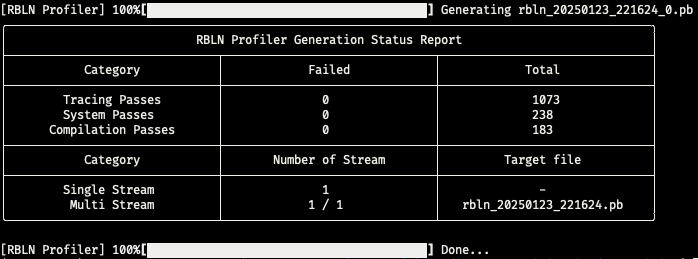
The RBLN Profiler Generation Status Report shows all status information generated during the tracing and generation process of the RBLN Profiler, displayed across three categories.
-
System Passes: monitor general system issues and verify memory allocation status as well as the profiling data generated by the Command Processor. -
Compilation Passes: verify and modify model information generated by the RBLN Compiler based on system constraints. -
Tracing Passes: collect and verify profiling data from the Command Processor, analyze it, and preprocess it for visualization by reorganizing its layout and transforming its structure for Protocol Buffer file generation and serialization.
Note
If the RBLN Profiler Generation Status Report consistently reports Failed, contact client_support@rebellions.ai.
- Extracted Filename
Multi Stream(Full log):rbln_{date}_{time}.pb- This single
*.pbfile represents all tracing information from all inference runs within a single profiler instance in one plot.
- This single
Single Stream(Log by sequence):rbln_{date}_{time}_{sequence_index}.pb- These files represent tracing information for a single module inference within a single profiler instance in one plot. Specifically, one
*.pbfile is generated for each inference run of each module.
- These files represent tracing information for a single module inference within a single profiler instance in one plot. Specifically, one
The generated *.pb files can be visualized using Perfetto.
Next Steps
- YOLOv8 (Object Detection) explains how to analyze an ATOM™ trace.
Profiling with RBLN Optimum and RBLN vLLM
RBLN Optimum (optimum-rbln) and RBLN vLLM (vllm-rbln) create and run runtimes through the RBLN Profiler API internally. Choosing what to profile and when to record therefore works as described above, and each package exposes them in a form that fits how the package is used.
Option 1: Using optimum-rbln
Extract the profiling data with optimum-rbln as follows.
Compile Model
The BERT-base model from optimum-rbln can be compiled with the following command. When the model compilation is completed, the bert-base-cased-squad2 directory is created.
Activate RBLN Profiler
Profile the model by either setting the environment variable RBLN_PROFILER=1 while running inference, or using the argument rbln_activate_profiler=True in optimum-rbln.
-
Using the environment variable: set the environment variable
RBLN_PROFILER=1to enable the RBLN Profiler. -
Using the optimum-rbln API: set
rbln_activate_profiler=Trueto activate the RBLN Profiler.
Extract Profiled Data with Inference
-
You can obtain the profiling data without any additional setting:
-
The
optimum-rblnAPI also supports scoped profiling methods as shown below:
Next Steps
The following case studies analyze the traces of models run with optimum-rbln.
- Stable Diffusion 3 (Image Generation) and Llama3-8B (Text Generation) explain how to analyze ATOM™ traces.
- Qwen3-1.7B (Text Generation) explains how to analyze a Rebel100™ trace.
Option 2: Using vllm-rbln
Extract the profiling data with vllm-rbln as follows. The vllm-rbln package follows vLLM's own profiling workflow — set the window with start_profile() and stop_profile() — and the RBLN Profiler can be enabled with RBLN_PROFILER=1. For installation and model preparation, refer to RBLN vLLM.
Activate RBLN Profiler
Setting the environment variable RBLN_PROFILER=1 while running inference enables the RBLN Profiler. The RBLN Profiler runs on the vllm model implementation, and passing model_impl="vllm" to LLM selects it.
The example script already sets "profiler": "torch" in profiler_config. Which profiler start_profile() and stop_profile() control depends on the profiler_config setting.
- Without it: the RBLN Profiler runs on its own and writes a
*.pbfile. - With
"profiler": "torch": the PyTorch profiler owns the profiling session, and the device windows the RBLN Profiler collects are merged into the PyTorch profiler's outputchrometrace. This merge works on Rebel100™ only; it is not supported on ATOM™.
For the remaining profiler_config options, refer to the Profiling Guide.
Extract Profiled Data with Inference
Wrapping generate() with start_profile() and stop_profile() keeps only that window in the trace. The first generate() call initializes the compiled models, so run it before the measured window to keep it out of the trace.
stop_profile() returns only after every worker has finished writing its trace. Where the workers run in their own processes, they are torn down when the engine shuts down, so without this window, any trace data that has not been written by then may be lost.
A trace file is written per worker, in the format described in Check the Profiling Result.
Next Steps
See the following trace analysis methods and case studies for models run with vllm-rbln.
- Understanding Chiplet, Workload, and CCL Tracks describes how a Rebel100™ trace is laid out.
- gpt-oss-20b analyzes the trace of a single device.
- gpt-oss-20b (Data Parallelism) covers per-rank traces and collective communication.
- Merging Multiple Traces shows how to view the per-rank
chrometracefiles on one timeline.