Installing the RBLN NPU Operator in a Disconnected or Air-gapped Environment
Overview
This document describes how to install and configure the RBLN NPU Operator on an OpenShift Container Platform cluster that has no direct internet access — a disconnected or air-gapped environment. In such environments, every container image, Operator catalog, and RBLN driver must be mirrored in advance to an internal registry reachable from all nodes.
The installation procedure itself is identical to the standard OpenShift installation guide flow, preceded by additional mirroring and mirror registry configuration steps. Every procedure in this document applies to a cluster that is already installed and running.
In environments that require strict network isolation for security or compliance, cluster nodes cannot pull images from public registries such as registry.redhat.io, Docker Hub, or ghcr.io. Instead, the required images are mirrored once to an internal registry, and the cluster is configured so that all image pulls are directed to that registry.
The same constraint applies to OperatorHub. The default OperatorHub sources assume that OLM (Operator Lifecycle Manager) pulls catalog images directly from registry.redhat.io, so OLM cannot access the default sources on a disconnected cluster. Therefore, disable the default sources and replace them with a CatalogSource that points to the mirrored catalog (see Configuring the mirror registry).
Disconnected environments come in two forms — one where the mirror can be refreshed through a mirror host (bastion host) with controlled egress, and a fully disconnected air-gapped environment that requires removable media to physically move the mirrored content into the isolated network. This document describes the former as Topology A and the latter as Topology B. Both approaches mirror the same set of images; the only difference is the path the content takes to reach the internal registry.
Topology A — Mirroring through controlled egress
Cluster nodes have no internet egress, but a dedicated mirror host pulls images through a controlled forward proxy and pushes them to the internal registry. The mirror can be refreshed without bringing in removable media.
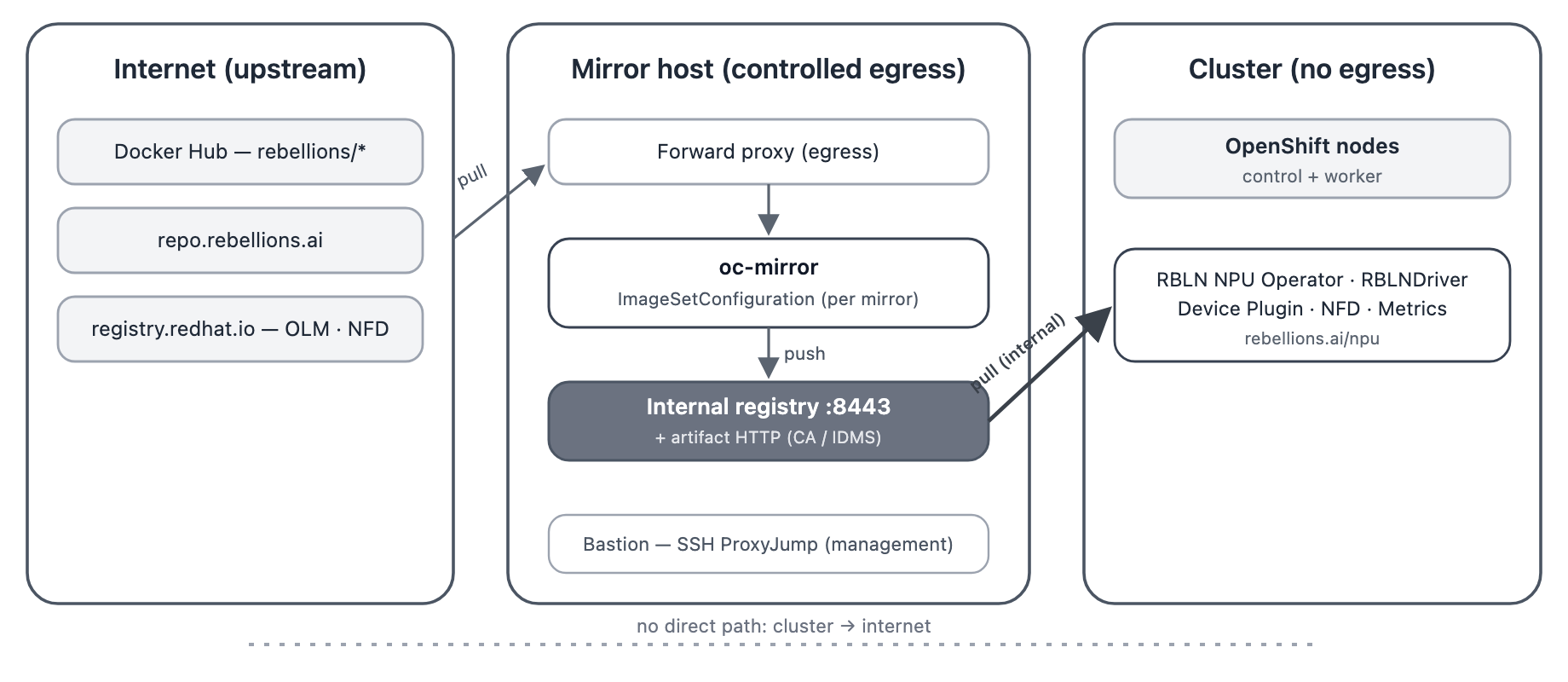
Topology A. Only the mirror host has egress. The cluster pulls exclusively from the internal registry, and the mirror is refreshed by re-running oc-mirror.
Topology B — Air gap (removable media)
There is no network path at all between the connected network and the air-gapped environment. Images are downloaded to a disk archive on a connected host, moved on removable media, and imported into the internal registry on the air-gapped side. This corresponds to environments that require the highest level of isolation.
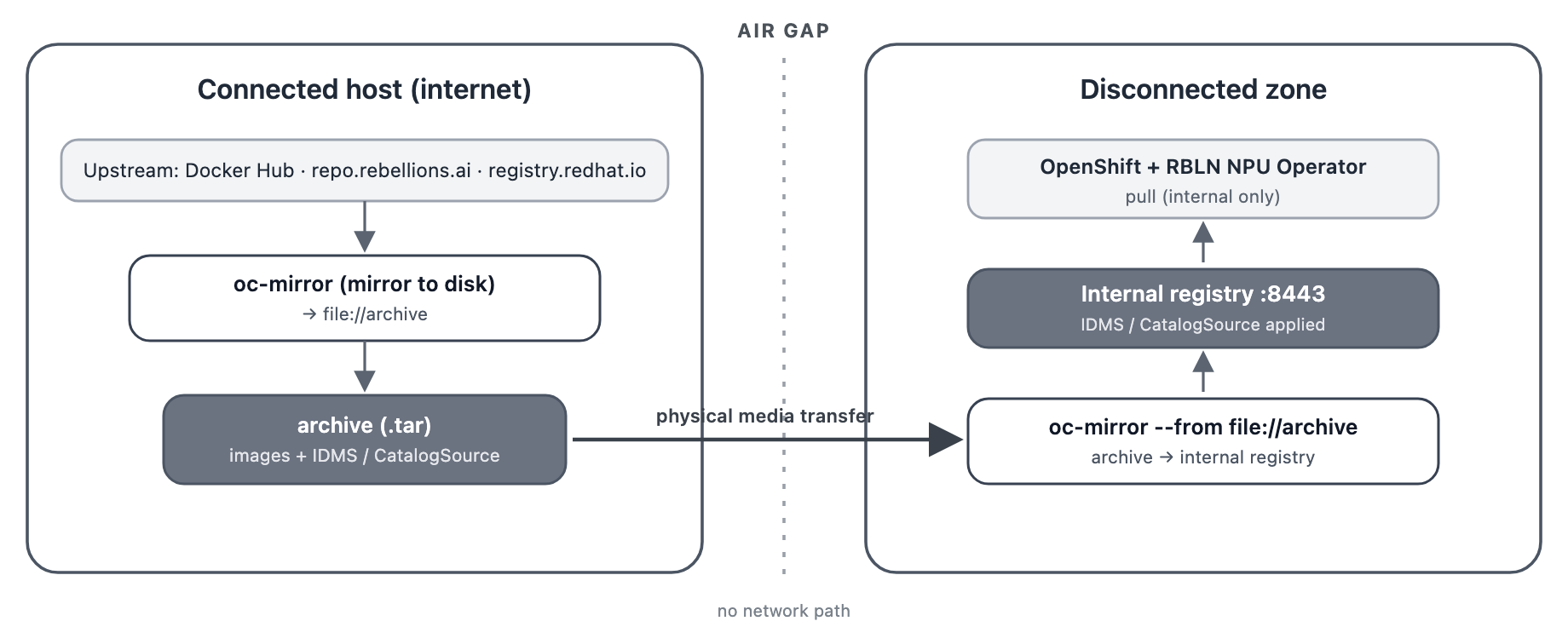
Topology B. oc-mirror runs twice — mirror-to-disk on the connected host, then the archive is carried in on removable media and imported into the internal registry.
Prerequisites
Ensure the following before proceeding:
- A properly functioning OpenShift Container Platform cluster (4.19 or later) that includes NPU worker nodes, and
cluster-adminprivileges. For details on installing OpenShift Container Platform, see the OpenShift Container Platform installation guide. - An internal image registry that supports the Docker v2-2 specification and is reachable from all cluster nodes (for example, Quay), with a TLS certificate the cluster trusts.
- A mirror host with the
ocandoc-mirrorbinaries and credentials for the upstream registries to be mirrored. - A Red Hat pull secret and pull credentials for the Rebellions registry (
repo.rebellions.ai). Access torepo.rebellions.airequires RBLN Portal account authentication. - Nodes equipped with Rebellions NPU (PCI vendor ID
1eff).
Mirroring Container Images
There are two mirroring targets — the RBLN NPU Operator and the NFD (Node Feature Discovery) Operator — defined together in a single ImageSetConfiguration (imageset-config.yaml). Both targets are required. Set the catalog index tag in the example (v4.21) to match the OpenShift version of your cluster.
| Mirror target | Contents |
|---|---|
| RBLN NPU Operator | certified operator catalog (operand images included) + rbln-smd / rbln-driver additional images (requires repo.rebellions.ai pull credentials) |
| NFD | Node Feature Discovery Operator from the redhat operator catalog — a dependency of the RBLN NPU Operator |
ImageSetConfiguration
The RBLN NPU Operator and its operand images are delivered as part of the certified operator catalog, and the NFD Operator, which the RBLN NPU Operator depends on, comes from the redhat operator catalog. Only the rbln-smd and rbln-driver images, which are not included in the catalogs, are configured as separate additionalImages. Pulling these two images requires repo.rebellions.ai credentials (see Prerequisites). The image path in RBLNDriver is rebellions/rbln-driver, whereas the actual driver image lives under the NPU family path (rebellions/atom/rbln-driver). Therefore, specify the family-path image in additionalImages.
Node kernel version match
rbln-driver is delivered as a precompiled image built for a specific kernel version. Pin the kernel version of your NPU nodes and make sure the matching image is included in the image set. If no driver image matching the node kernel has been mirrored, the driver cannot be loaded on a disconnected cluster. See Checking the kernel and RHEL versions below for how to verify.
Checking the kernel and RHEL versions
RBLN driver images are precompiled for specific kernel versions, and the image tags follow this convention.
When the driver is loaded, a tag is composed with the node's kernel version using the same convention and the image is pulled, so the mirrored tag must exactly match the kernel version of the cluster nodes. Check the kernel and RHEL versions directly from the node information of the cluster.
-
Query the node kernel version
The
KERNEL-VERSIONcolumn ofoc get nodes -o wideshows the same value. The RHEL version is embedded in the kernel version string —el9_6corresponds to RHEL9.6. -
Compose the driver image tag
Compose the tag from the queried kernel version, the RHEL version, and the driver version you use, and include it in the
additionalImagesof theImageSetConfiguration. For example, with driver version3.2.2and the kernel version above:
Note
If the host performing the mirroring cannot access the cluster, the kernel and RHEL versions of an OpenShift release can also be checked from that release's driver-toolkit image.
Running oc-mirror
Run oc-mirror with the ImageSetConfiguration defined above. How you run it depends on the topology.
Topology A — Mirroring directly to the internal registry
The mirror host pulls images from the upstream registries through controlled egress and pushes them straight to the internal registry.
-
Registry authentication
On the host performing the mirroring, log in to the upstream registries and the internal registry. Log in to
repo.rebellions.ai, which serves the RBLN driver and daemon images, with the RBLN Portal account issued to you. -
Run the mirror
With the target registry specified as
docker://, images are pushed immediately. Mirroring directly to a registry requires the--workspaceoption, which sets the local directory for the working files and generated manifests. The--remove-signaturesflag excludes image signatures from the copy, avoiding push failures on internal registries that do not accept signatures. -
Check the artifacts
When the run completes,
ImageDigestMirrorSet/ImageTagMirrorSetandCatalogSourcemanifests are generated underworking-dir/cluster-resources/in the workspace directory. These files are applied to the cluster in the next step, Configuring the mirror registry.
Topology B — Via disk (air gap)
There is no network path between the connected host and the air-gapped environment, so run oc-mirror and move the archive on removable media.
-
Connected host — mirror to disk
After registry authentication, download the images into a local disk archive (the target is
file://). -
Transfer the archive on removable media
Copy the generated
./archivedirectory together withimageset-config.yamlonto removable media such as a USB drive or removable disk, and carry them to a host on the air-gapped side. -
Air-gapped side — import into the internal registry
Push the archive brought in on removable media to the internal registry (the source is
--from file://).The artifacts (IDMS/ITMS, CatalogSource) are generated on the air-gapped side at this step and are applied in Configuring the mirror registry, the same as Topology A.
Configuring the Mirror Registry
After mirroring, configure the cluster to authenticate to the internal registry, trust its certificate, and direct image pulls to it.
-
Update the global pull secret
Add the internal registry credentials to the cluster global pull secret.
-
Configure trust for the registry CA
Add the internal registry CA to the cluster trust bundle.
-
Apply the generated cluster resources
Apply the cluster resources generated by
oc-mirror: theImageDigestMirrorSet/ImageTagMirrorSetthat redirect image pulls to the internal registry, and theCatalogSourcefor the mirrored catalogs.<WORKSPACE_DIR>is./workspacefor Topology A and./archivefor Topology B. -
Disable the default OperatorHub sources
As explained in the Overview, OLM cannot access the default sources on a disconnected cluster. Disable them so that the mirrored
CatalogSourceapplied in the previous step becomes the only Operator source.
Verifying the mirrored catalog
Before installing the Operator, confirm that the mirrored CatalogSource is working.
If the catalog Pod is Running and the PackageManifest entries for rbln-npu-operator and nfd are listed, the catalog is healthy. The mirrored Operators also appear in the web console under Operators > OperatorHub.
Installation Steps
Once mirroring and registry configuration are complete, the remaining installation steps are the same as in a connected environment. Follow the RBLN NPU Operator Installation Guide for OpenShift, applying only the following addition when creating the Subscription CRs for the NFD Operator and the RBLN NPU Operator.
-
Set
spec.sourceto the mirroredCatalogSourcename (e.g.cs-certified-operator-index-v4-21; for NFD,cs-redhat-operator-index-v4-21). Verify the actual names in Verifying the mirrored catalog.
Verifying the Installation
Verify the installation as described in the standard installation guide. In a disconnected environment, additionally confirm that no Pod in the rbln-system namespace is in ImagePullBackOff, which indicates that every required image has been mirrored and redirected to the internal registry.