RBLN System Management Daemon
Overview
RSMD (Rebellions System Management Daemon) monitors and controls RBLN NPU devices. It bridges kernel driver interfaces and provides a unified gRPC-based API surface for device management operations.
RSMD enables real-time monitoring of device health metrics including temperature, power consumption, memory usage, clock frequencies, and utilization. The daemon collects kernel events via netlink sockets and maintains event history and coredumps for diagnostic purposes. Device control operations such as resets, RSD group management, and runtime configuration changes are exposed through the gRPC interface.
The system provides a command-line interface (rbln-smdi) for interactive device management. RSMD operates as a systemd service, providing centralized management capabilities for multiple NPU devices in production environments, with mTLS and IP/CN-based access control to make remote operation safe.
Architecture
RSMD follows a daemon–client model. A single rbln-smd process owns access to every NPU on the host and exposes them through one gRPC interface; the rbln-smdi CLI, remote clients, and automation connect to that interface rather than to the kernel directly. Centralizing access behind one endpoint keeps a continuous record of kernel events that on-demand tools would miss and places every remote operation behind a single mTLS and allowlist boundary.
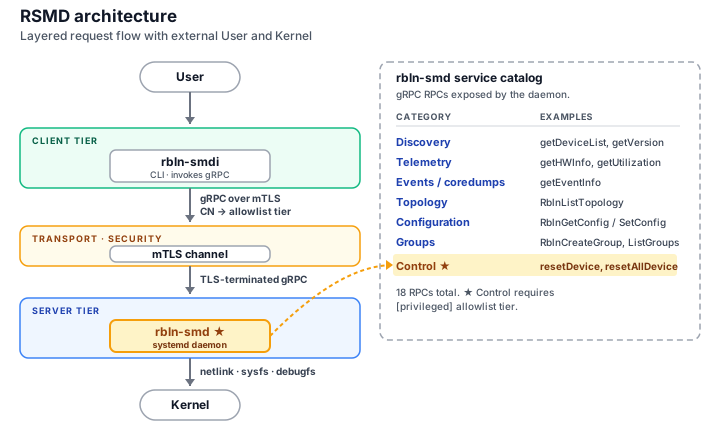
| Component | Role |
|---|---|
rbln-smd |
Background daemon — collects kernel events, reads device telemetry, and executes device control, exposing all of it over gRPC. |
rbln-smdi |
Command-line client — interactive queries and control, including connections to a daemon on a remote host. |
rbln_smd.proto |
gRPC contract — the service and message definitions clients use to generate language bindings. |
Core Components
Daemon (rbln-smd)
rbln-smd is the core daemon that runs continuously in the background, providing device management capabilities through a gRPC interface.
Deprecation
A binary-identical copy is also installed as rbln_daemon for backward compatibility with earlier configurations. This legacy name is scheduled for removal in v4.0; migrate scripts and tooling to rbln-smd.
Functionality
rbln-smd performs the following:
- Monitors kernel events via netlink sockets and persists them as CSV logs
- Exposes device telemetry (temperature, power, memory, clock, utilization) through the gRPC interface
- Handles device control operations such as resets
- Manages RSD groups (creation and destruction)
- Enforces mTLS and IP/CN-based access control
Features
- Operates as a systemd service (
rbln-smd.service) for automatic startup and lifecycle management - Supports both TCP (default port 50051) and Unix domain sockets for client connections
- Configurable event and coredump retention with automatic rotation
Configuration
The following environment variables control daemon behavior:
RBLN_SMD_PORT(default:50051): TCP port for gRPC serverRSMD_MAX_EVENTS_PER_DEV(default:1000): Maximum events retained per device. The oldest events are removed when the limit is reached.RSMD_MAX_COREDUMPS_PER_DEV(default:200): Maximum coredump directories retained per device. The oldest entries are removed when the limit is reached.RSMD_CERT_PATH: Server certificate directory when mTLS is enabled.--certtakes precedence.
Command-line Flags
The daemon accepts the following flags (append to ExecStart= in the systemd unit, or override with systemctl edit):
--mtls: Enable mTLS mode.--allow-reset: Allow device reset calls (resetDevice,resetAllDevice).--cert <dir>: TLS server certificate directory.-a, --allowlist <file>: Per-client access restriction file (IP / CN based).--uri <uri>: Alternate binding (e.g.,unix:///var/run/rbln.sock).--pid-file <path>: PID file path (default/run/rbln-smd.pid).
Info
See Access Control and mTLS for the full behavior of the security-related flags (--mtls, --allow-reset, --cert, -a, --allowlist).
Service Management
The daemon runs as a systemd service. Service status can be checked with:
Logs are available through the systemd journal:
The daemon can be configured to use a Unix domain socket in addition to the TCP port by specifying the --uri option in the systemd service configuration:
Info
rbln-smd.service and rbln_daemon.service point to the same binary and are mutually excluded by systemd Conflicts=. If both units are enabled, only one runs.
Event Logs
Device events are stored in /var/log/rebellions/rsmd_<device>.event as CSV files. These logs contain:
- Event type and source
- Timestamps (UTC and kernel time)
- Event data and sub-values
Protobuf API
The protobuf API defines the gRPC service interface that all RSMD clients use. The protobuf schema (rbln_smd.proto) provides a language-agnostic interface definition that enables client generation in multiple programming languages including Python, C++, Go, and Java. By strictly defining data types, the API ensures data integrity and optimizes performance through efficient binary compression.
Available Services
The RBLNServices gRPC service provides the following RPC methods:
| Method | Description | Returns |
|---|---|---|
getDeviceList |
List all detected devices | Stream of Device |
getServiceableDeviceList |
List devices ready for operations | Stream of Device |
resetDevice |
Reset a specific device | StatusMsg |
resetAllDevice |
Reset all devices in system | StatusMsg |
getVersion |
Get firmware, driver, and SMC versions | VersionInfo |
getHWInfo |
Get temperature and power consumption | HWInfo |
getMemoryInfo |
Get total and used memory | MemoryInfo |
getClockInfo |
Get device clock frequencies | ClockInfo |
getEventInfo |
Get hardware events from kernel | Stream of EventInfo |
getTotalInfo |
Get comprehensive device information | Stream of DeviceInfo |
getUtilization |
Get NPU utilization percentage | UtilInfo |
RblnListTopology |
Get device topology (NUMA, CPU affinity, RSD group, PCIe link) | RblnListTopologyResponse |
RblnListCoredumps |
List coredump entries for devices | RblnListCoredumpsResponse |
RblnGetConfig |
Get a runtime configuration value | RblnGetConfigResponse |
RblnSetConfig |
Set a runtime configuration value | RblnSetConfigResponse |
RblnListGroups |
List active RSD groups | RblnListGroupsResponse |
RblnCreateGroup |
Create an RSD group with the specified devices | RblnGroupOpResponse |
RblnDestroyGroup |
Destroy an RSD group by group ID (-1 destroys all) |
RblnGroupOpResponse |
Message Types
Key message types include:
Device: Device identifier (name, UUID, PCI bus ID, device ID, card name)DeviceInfo: Complete device status (memory, temperature, power, version, utilization, status, P-state)HWInfo: Hardware telemetry (temperature in milli-Celsius, power in micro-watts)MemoryInfo: Memory usage (total and used in GB)ClockInfo: Clock frequencies for CP, DNC, Bus, SHM, DRAM (MHz)EventInfo: Kernel-reported events with timestampsVersionInfo: Firmware, driver, and SMC versionsUtilInfo: Device utilization percentageTopologyEntry: NUMA node, CPU affinity, RSD group, PCIe link speed/widthCoredumpEntry: Coredump directory path with timestampGroupEntry: RSD group ID, name, and member devicesDeviceFilter: Server-side device filter (device_ids/group_ids, mutually exclusive)ErrorDetail: Per-item error code and message (empty on success)
Protocol Definition
The protocol buffer definition file (rbln_smd.proto) is typically installed in /opt/rebellions/etc/ or a similar system location. Client applications use this file to generate language-specific bindings for gRPC communication with the daemon.
Deprecation
The same definition is also installed under the legacy name rbln_services.proto for backward compatibility. This alias is scheduled for removal in v4.0; update build scripts to reference rbln_smd.proto.
CLI (rbln-smdi)
The rbln-smdi command-line interface provides interactive access to RSMD functionality. The tool offers formatted table output for human-readable results, with optional JSON output for automation and scripting use cases. The CLI supports remote connections to daemon instances running on different hosts.
Common Options
Most subcommands accept:
--ip <address>: gRPC server IP (default:localhost)--port <number>: gRPC server port (overrides~/.rbln-smdi/config)--jsons: Output in JSON format instead of tables
Global flags appear before the subcommand:
--tls <path>: Path to the client certificate for one-off mTLS invocations.--uri <URI>: Daemon connection URI (e.g.,unix:///var/run/rbln.sock). Overrides--ipand--port.-V, --version: Print the CLI version.
status, topo, and journal accept additional filter options:
-d <SPEC>: Device number filter.NselectsrblnN. Examples:0,0,2,0-3. Default: all devices.-g <SPEC>: RSD group filter.NselectsrsdN. Ignored when-dis also specified.
Persistent Configuration
The file ~/.rbln-smdi/config accepts the following keys:
secure=true|false: Whether to use TLS (defaultfalse).cert_path=<path>: TLS client certificate directory.port=<number>: Default port used when--portis not specified.
Info
See Access Control and mTLS for the full behavior of the security-related options (--tls, secure, cert_path).
CLI Examples
Summary
Lists all detected NPU devices with card name, PCI BDF, UUID, firmware versions, RSD group, and status.
Command
Output (example)
+-------------------------------------------------------------------------+
|                             Device Discovery                            |
+=====+======================================+============+======+========+
| NPU | Identifiers                          | FW Ver     | RSD  | Status |
+-----+--------------------------------------+------------+------+--------+
|   0 | rbln0                      RBLN-CA25 | CP:  1.2.3 | rsd0 | READY  |
|     | 0000:47:00.0                         | SMC: 4.5.6 |      |        |
|     | 00000000-0000-0000-0000-000000000001 |            |      |        |
+-----+--------------------------------------+------------+------+--------+
Summary
Displays temperature, power, memory usage, NPU utilization, and device status. Narrow the scope with -d or -g.
Command
Output (example)
+---------------------------------------------------------------------------------------------------+
|                                           Device Status                                           |
+======+=====+======+========+=======+===========+======+==========+=============+=========+========+
| RSD  | NPU | Name | Device |  Temp | Power(mW) | Perf | DNC(MHz) |    Memory   | Util(%) | Status |
+------+-----+------+--------+-------+-----------+------+----------+-------------+---------+--------+
| rsd0 |   0 | CA25 | rbln0  | 45.23 |     100.5 |  0   |   1000   | 2.5/16.0 GB |   15.5  | READY  |
+------+-----+------+--------+-------+-----------+------+----------+-------------+---------+--------+
Summary
Displays NUMA node, CPU affinity, RSD group, and PCIe link information.
Command
Output (example)
+----------------------------------------------------------------------------------------------+
|                                       Device Topology                                        |
+===========+=====+========+==============+===========+==============+============+============+
| RSD Group | NPU | Device |   PCI BDF    | NUMA Node | CPU Affinity | PCIe Speed | PCIe Width |
+-----------+-----+--------+--------------+-----------+--------------+------------+------------+
| rsd0      |   0 | rbln0  | 0000:47:00.0 |     0     | 0-63         |  16 GT/s   |    x16     |
+-----------+-----+--------+--------------+-----------+--------------+------------+------------+
Summary
Shows kernel event history and coredump entries together. Use --type to limit the output to one of them.
Command
Output (example)
+-------------------------------------------------------------------------------------+
|                                        Events                                       |
+=====+==========+=============+=====================+=============+==========+=======+
| IDX | DEV NAME |     TYPE    |       UTC TIME      | KERNEL TIME |  DATA1   | DATA2 |
+-----+----------+-------------+---------------------+-------------+----------+-------+
|  0  |  rbln0   | NO_RESPONSE | 2026-01-15 10:30:45 |  12345.678  | CP_EVENT |  0x0  |
+-----+----------+-------------+---------------------+-------------+----------+-------+

+-------------------------------------------------------------------------------+
|                                   Coredumps                                   |
+=====+==========+=====================+========================================+
| IDX | DEV NAME |      TIMESTAMP      |                  PATH                  |
+-----+----------+---------------------+----------------------------------------+
|  0  |  rbln0   | 2026-01-15 10:25:12 | /var/lib/rebellions/coredump/rbln0/... |
+-----+----------+---------------------+----------------------------------------+
Summary
Lists, creates, or destroys RSD groups. Use --attach with --create to specify group-local NPU IDs. --destroy all destroys every group.
Command
Output (example)
+------------------------------------------------+
|                   RSD Groups                   |
+==========+============+=========+==============+
| Group ID | Group Name | NPU IDs | Device Count |
+----------+------------+---------+--------------+
|    1     |    rsd1    |   0,1   |      2       |
+----------+------------+---------+--------------+
Summary
Gets or sets a daemon runtime configuration value. Changes take effect immediately without a daemon restart.
Command
Output (example)
+----------------------------+
|           Config           |
+----------------------------+
| RSMD Ver: 3.2.0            |
| max_events_per_dev: 1000   |
| max_coredumps_per_dev: 200 |
| log_level: 6               |
+----------------------------+
Summary
Resets a specific device or all devices. The daemon must be running with --allow-reset.
Command
Output (example)
On failure
Access Control and mTLS
This section covers the configuration needed to operate RSMD with mTLS and access control, split into daemon-side and client-side settings. Both sides must be configured consistently for the secure channel to come up.
Check the current mode
Daemon (rbln-smd) Configuration
rbln-smd configures transport security and access control with three independent flags plus a certificate directory. Specify them in the systemd unit or as CLI options when starting the daemon.
Access Control Flags
| Flag | Purpose |
|---|---|
--mtls |
Enable mTLS mode. Opens a TLS-only channel on RBLN_SMD_PORT. Without this flag, an insecure channel is opened. |
--allow-reset |
Allow device reset calls (resetDevice, resetAllDevice). Without this flag, reset calls are always denied. |
--allowlist <path> |
2-tier allowlist file. Restricts which clients may access the daemon and which may call reset. |
Operating Modes
| Mode | Flags | Behavior |
|---|---|---|
| Monitoring only (default) | (none) | Insecure channel, reset denied |
| Insecure + reset | --allow-reset |
Insecure channel, any client may reset |
| mTLS monitoring | --mtls |
TLS-only channel, reset denied |
| mTLS + reset | --mtls --allow-reset |
TLS-only channel, any mTLS client may reset |
| Restricted access | --allow-reset -a /path/to/allowlist |
Allowlisted clients only; privileged tier may reset |
Warning
With --mtls alone, any client presenting a valid certificate signed by the trusted CA can access all APIs except reset. To restrict per-client access, combine --mtls with --allowlist.
Allowlist
The allowlist is an INI-style file with [basic] and [privileged] sections. When the specified file does not exist, the daemon creates a template with guidance comments.
Supported entry types:
- IPv4 address:
192.168.1.100 - IPv4 CIDR:
192.168.10.0/24 - IPv6 address:
::1 - IPv6 CIDR:
fe80::/10 - CN string:
client-service-name(evaluated only on mTLS channels)
Channel rules:
- Insecure channel: Only IP / CIDR entries are evaluated.
-
mTLS channel: Entries are evaluated in this order, and the first matching step decides the result:
- CN listed in
[privileged]→ privileged - CN listed in
[basic]→ basic - IP / CIDR matches
[privileged]→ privileged - IP / CIDR matches
[basic]→ basic - No match → denied
When a client is registered under both CN and IP, the earlier step wins. For example, a client whose CN appears in
[basic]while its IP appears in[privileged]resolves to basic. - CN listed in
The allowlist file is checked for modifications via mtime on each gRPC request. Changes take effect on the next request without restarting the daemon. Entities that do not appear in any section are denied all access, including monitoring APIs.
Server Certificates
With --mtls enabled, the daemon reads the following three files from the certificate directory:
| Filename | Purpose |
|---|---|
rsmd_ca.crt |
CA certificate used to verify client certificates |
rsmd_server.crt |
Server certificate |
rsmd_server.key |
Server private key |
The daemon resolves the directory in this order:
- The
--cert <dir>CLI flag - The
RSMD_CERT_PATHenvironment variable - The OS default path —
/etc/ssl/certs/on Debian / Ubuntu,/etc/pki/tls/certs/on RHEL / CentOS / Fedora
Restrict the private key (rsmd_server.key) so users other than the daemon cannot read it (for example, the daemon's user account with mode 0600). Symbolic links are rejected for safety (O_NOFOLLOW).
Client (rbln-smdi) Configuration
rbln-smdi decides whether to connect to the daemon over an mTLS channel and which certificate to present. When the daemon runs with --mtls, the client must also enable TLS.
TLS Activation
TLS channel use and the certificate location are resolved in this order:
- The
--tls <path>CLI flag — enables TLS for the current invocation and connects with the certificate at the given path. Accepts either a.crt/.keyfile or a base path without the extension. - The
RSMD_IF_CERT_PATHenvironment variable — same base path format as above, applied per shell session. - The
secure=trueandcert_pathkeys in~/.rbln-smdi/config— a persistent setting that applies to every subsequent invocation.
--tls and RSMD_IF_CERT_PATH exit with an error if the files are not found at the resolved path. cert_path acts only as a fallback and is disabled silently when the files are missing. If none of the three apply, the client connects over the insecure channel.
Client Certificates
When the client uses the mTLS channel, it reads the following three files:
| Filename | Purpose |
|---|---|
rsmd_ca.crt |
CA certificate used to verify the server certificate |
rsmd_client.crt |
Client certificate |
rsmd_client.key |
Client private key |
Symbolic links are rejected (O_NOFOLLOW). When per-client access control is required, register the CN of the client certificate in the server-side allowlist.
Certificate Renewal
When overwriting certificates in place, the server side requires a daemon restart and incurs a brief downtime. The client side picks up the new certificate on the next call.
When moving to new paths, update RSMD_CERT_PATH or --cert on the server and restart the daemon. On the client, update RSMD_IF_CERT_PATH or the cert_path value in the config.
Renewing only the client-side certificate requires no daemon restart.
Telemetry Units
RSMD uses the following units for telemetry data:
- Temperature: milli-degree Celsius (Divide by 1,000 to convert to °C)
- Power: micro-watts (Divide by 1,000,000 to convert to Watts)
- Memory: GB (GB)
- Clock: MHz (MHz)
- Utilization: percentage (0-100)
NOTE: The CLI tool automatically converts these into human-readable formats.
Recommendations
- Regular monitoring: Run scheduled checks to track device health metrics over time.
- Event and coredump retention: Tune
RSMD_MAX_EVENTS_PER_DEVandRSMD_MAX_COREDUMPS_PER_DEVto match available disk space. - Network security: Prefer Unix domain sockets for local access; for remote access, combine
--mtlswith--allowlist. Restrict the TCP port further with firewall rules. - Error handling: Check
err_statusfields in API responses before consuming results. - Log review: Periodically review event logs to identify anomalies and recurring patterns.
References
- gRPC Definition: The protocol buffer definition file (
rbln_smd.proto) is typically located in/opt/rebellions/etc/or a similar system configuration directory. Until v4.0, a copy is also installed under the namerbln_services.proto. - Systemd Service: The service unit file is installed at
/etc/systemd/system/rbln-smd.service. A compatibility alias/etc/systemd/system/rbln_daemon.serviceruns a binary-identical copy of the same daemon (scheduled for removal in v4.0).