Installing the RBLN NPU Operator in a Disconnected or Air-gapped Environment
Overview
Install the RBLN NPU Operator on an OpenShift cluster without direct internet access. Mirror the required catalogs and images to an internal registry before installing the Operator.
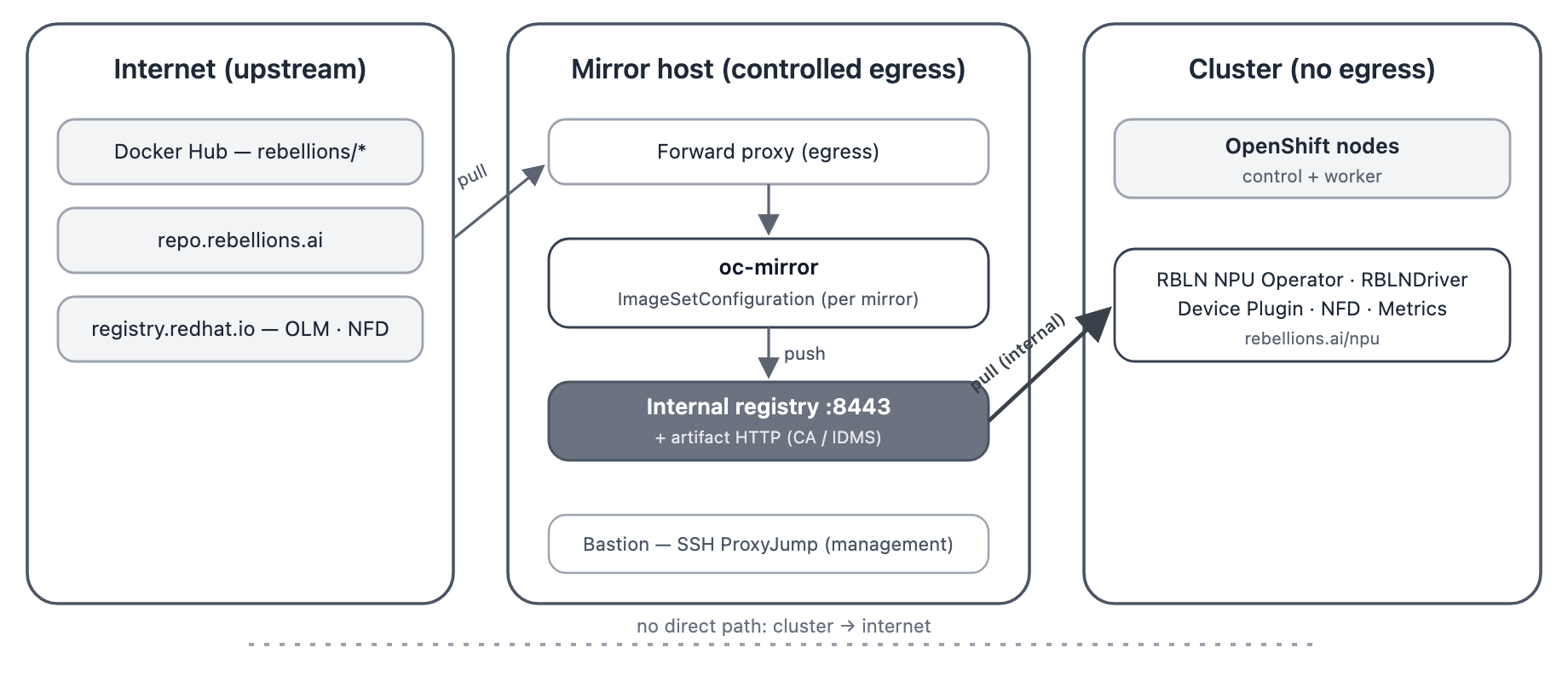
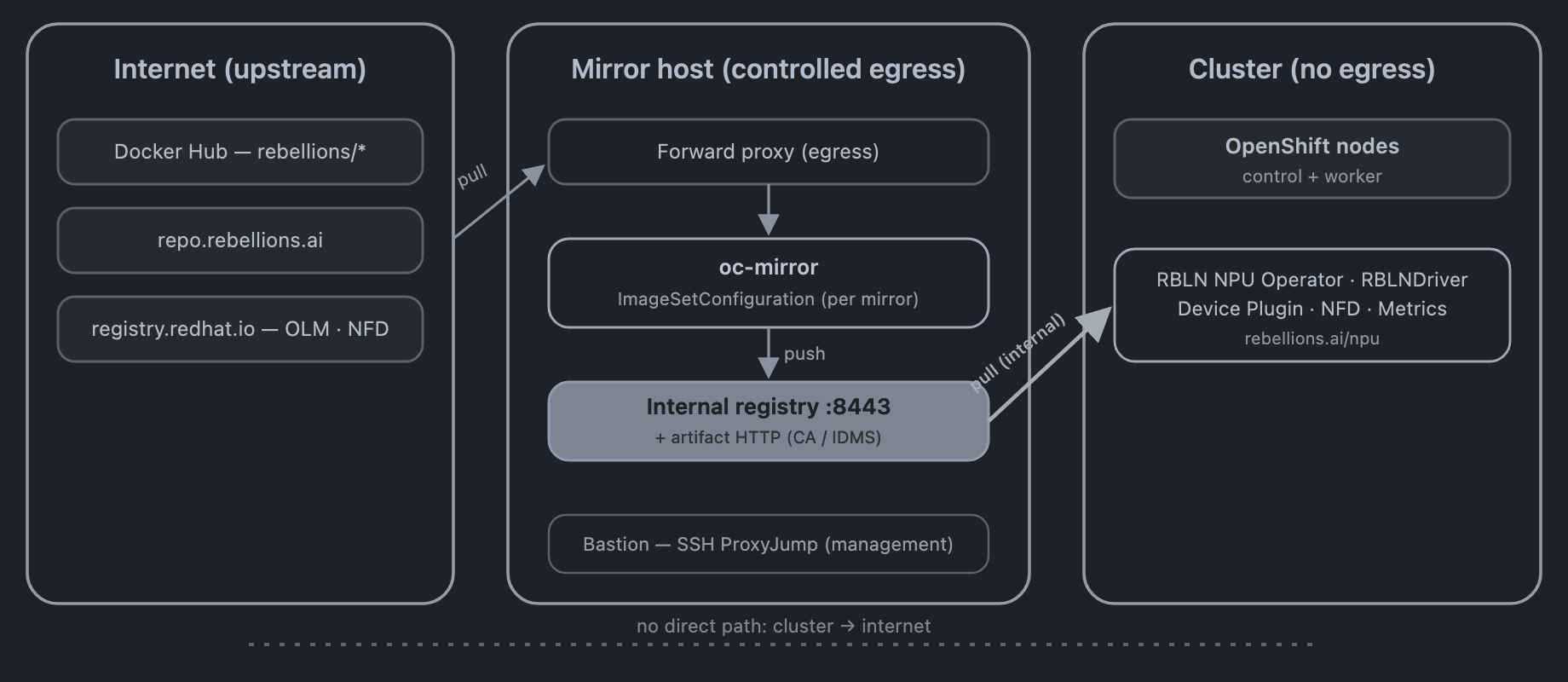
Topology A — Mirroring through controlled egress
The mirror host uses an approved external connection to download images and push them to the internal registry.
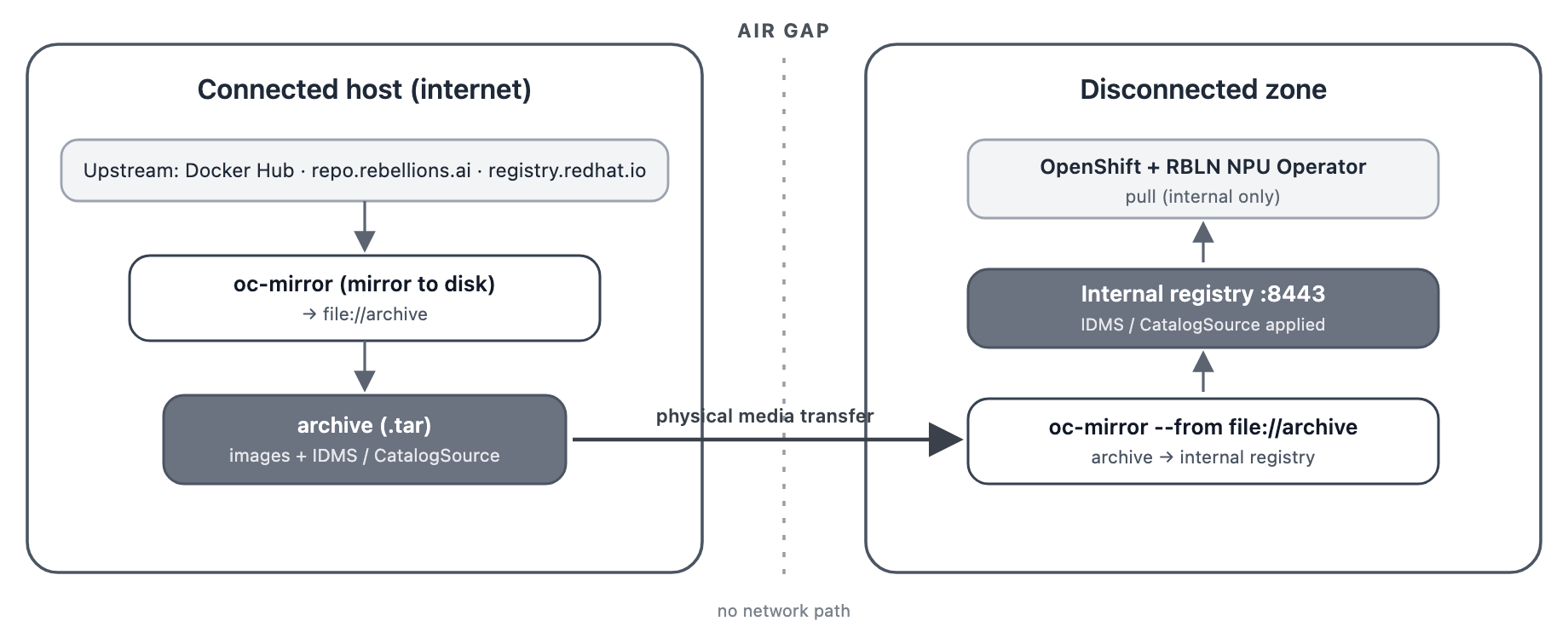
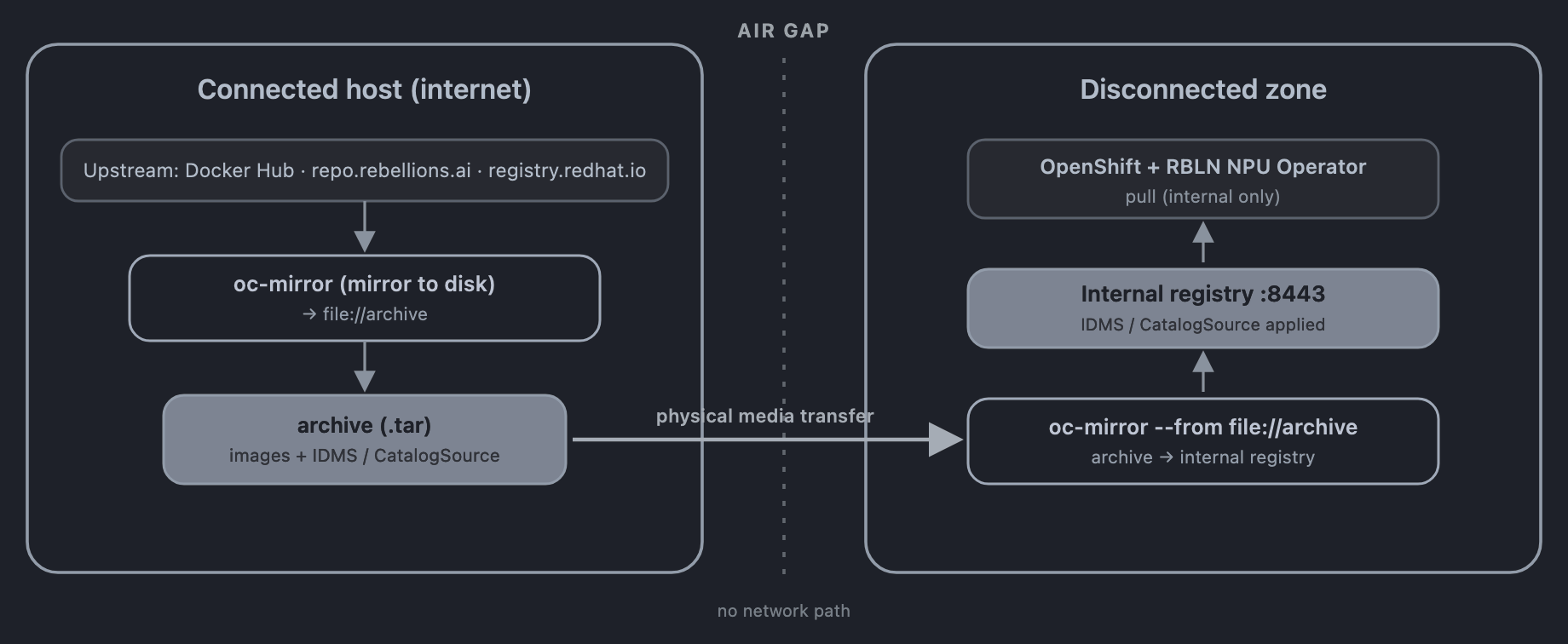
Topology B — Air gap (removable media)
Download images on an external network, transfer them on removable media, and import them into the internal registry.
Prerequisites
- An OpenShift Container Platform cluster covered by the support matrix and
cluster-adminprivileges - An internal registry supporting Docker v2-2, reachable from every cluster node, and a TLS certificate trusted by the cluster
- A mirror host with
ocandoc-mirror, and credentials for the source and internal registries - A Red Hat pull secret and an RBLN Portal account
- Worker nodes equipped with ATOM™ or Rebel100™ (PCI vendor ID
1eff)
Mirroring Container Images
Mirror the NPU Operator and NFD catalogs, plus the driver and RSMD images. Match the catalog tag (v4.21) to the cluster's OpenShift version.
ImageSetConfiguration
Save the example for your configuration as imageset-config.yaml. Select driver versions from the support matrix, use the node's kernel and RHEL versions, and confirm image availability through RBLN Portal.
Include atom or rebel100 in the driver image paths under additionalImages. Use rebellions/rbln-driver for spec.image in each RBLNDriver instance. See Driver image selection for the path rules.
Match each RSMD image tag to its driver version, listing each tag only once. Include driver images for every required combination of NPU family, version, OS, and kernel.
Node kernel version match
Driver images must match the node kernel version. Mirror the matching image whenever the kernel changes.
Checking the kernel and RHEL versions
Check the kernel version on each NPU worker node.
In this example, el9_6 indicates RHEL 9.6. Use the queried values in each family's image tags.
When the cluster is inaccessible
Check the kernel and RHEL versions in the driver-toolkit image for the OpenShift release in use.
Running oc-mirror
Log in to the source registries on the external mirror host and to the internal registry on the internal mirror host. For Topology A, log in to all registries on the same host.
Topology A — Mirroring directly to the internal registry
Topology B — Via disk (air gap)
-
Save images to an archive on the external mirror host.
-
Transfer
./archiveandimageset-config.yamlto the internal mirror host on removable media. -
Import the images into the internal registry.
Configuring the Mirror Registry
Configure cluster credentials, CA trust, and image mirror paths.
-
Update the global pull secret
Add the internal registry credentials to the cluster global pull secret.
-
Configure trust for the registry CA
Add the internal registry CA to the cluster trust bundle.
-
Apply the generated cluster resources
Apply the generated
ImageDigestMirrorSet,ImageTagMirrorSet, andCatalogSourceresources. Use./workspacefor<WORKSPACE_DIR>in Topology A and./archivein Topology B. -
Disable the default OperatorHub sources
Disable the default sources so OLM uses the mirrored catalogs instead of external catalogs.
Verifying the mirrored catalog
Before installing the Operator, confirm that the mirrored CatalogSource is working.
Confirm that the catalog Pod is Running and that the PackageManifest entries for rbln-npu-operator and nfd are listed.
Installation Steps
After mirroring images and configuring the registry, follow the RBLN NPU Operator Installation Guide for OpenShift. Set spec.source in the NFD Operator and RBLN NPU Operator Subscriptions to the appropriate mirrored CatalogSource name. Check the names in Verifying the mirrored catalog.
For the NFD Operator, use the NFD catalog name, such as cs-redhat-operator-index-v4-21.
For RHCOS nodes based on RHEL 10.2 and equipped with Rebel100™, apply the pciehp unbinding configuration before deploying the driver.
Driver instances for each NPU family
For a single family, set spec.version in the installation guide's driver.json to the mirrored driver version.
For a mixed configuration, create two instances from the installation guide's driver.json. Run the following commands instead of oc apply -f driver.json, using the mirrored driver versions.
See Running Multiple Driver Versions for node selection and version settings.
Verifying the Installation
Check that the RBLNClusterPolicy instance and each family's RBLNDriver instance report ready. The output below shows the mixed configuration created above, using ATOM™ 3.4.1 and Rebel100™ 3.5.1 with one node per family.
$ oc get rblnclusterpolicy \
  -o 'custom-columns=NAME:.metadata.name,STATE:.status.state'
NAME                  STATE
rbln-cluster-policy   ready

$ oc get rblndriver \
  -o 'custom-columns=NAME:.metadata.name,VERSION:.spec.version,STATE:.status.state,READY:.status.readyNodes,DESIRED:.status.desiredNodes'
NAME                   VERSION   STATE   READY   DESIRED
rbln-driver-atom       3.4.1     ready   1       1
rbln-driver-rebel100   3.5.1     ready   1       1
Confirm that each instance's VERSION matches the mirrored version and that the driver and RSMD Pods are Ready.