How to analyze the RBLN Profiler data using Perfetto
This section provides the foundation for analyzing profiling results by explaining the information displayed in the Perfetto UI.
Understanding Profiling Information

Task Details
-
Name Structure
The RBLN Profiler uses a naming convention for tasks structured as
i{instance_index}_{sequence_index}_W{workload_index}_{layer_name}_{command_index}. This format helps identify the specific stage in a neural network layer's operation and evaluate its performance at that stage.i{instance_index}identifies the runtime instance that executed the command. It appears only in theMulti Streamfile, which merges the records of several runtime instances;Single Streamfiles carry no prefix.sequence_indexrepresents the order in which the module was executed on that runtime instance, starting from 0 for each instance. In a merged file, therefore, it takes both the prefix and this index to identify one execution.W{workload_index}tells which runtime call (Device Workloadslice) the command ran in.Hostcommands carry no token. See Understanding Chiplet, Workload, and CCL Tracks.layer_namerefers to the specific tensor-level operation being performed. In cases where multiple operations are fused, they are grouped under the label "fused()" and joined with "+".command_indexidentifies the specific command generated by the RBLN Compiler when the operation is divided into multiple commands, distinguishing each individual command within that division.
For example,
i1_0_W2_fused(bn1+conv1+relu)_1in aMulti Streamfile is the second command of the fusedbn1,conv1, andreluoperation, run inDevice Workload_2of the first sequence of runtime instance 1. -
Category
The RBLN Profiler groups commands into the following categories. For more detailed information on each category, refer to the RBLN NPU Architecture page.
HostNeural Engine ClustersNeural DMATask DMAExternal HDMADevice HDMADevice SyncGeneral Compute Engine
The numbers next to the command names in the Perfetto UI are internal ID values assigned by the RBLN Profiler. These numbers are unrelated to the actual performance of the RBLN NPU.
-
Flow Connection (Preceding Flows & Following Flows)
The
Preceding FlowsandFollowing Flowsdisplayed at the bottom of the Perfetto UI represent dependencies among commands. During model compilation, these dependencies are determined to ensure that the Command Processor handles them correctly, taking the device's configuration and allocation status into account. Dependencies related to Neural DMAs are managed by the Task Manager within the Neural Engine, and, therefore, are not displayed in Perfetto.-
Between
External HDMAandTask DMA
External HDMAtransfers weight and input data from host DRAM to the device memory, creating a dependency with the initialTask DMAcommand that sends data from the device memory to the on-chip Shared Memory. Similarly, since the final output data retrieved byTask DMAmust be sent back to host DRAM viaExternal HDMA, it is essential to enforce a dependency ensuring thatExternal HDMAexecutes only afterTask DMAcompletes.These visualized flows demonstrate explicit dependencies among commands. However, this does not imply that a command without connections has no sequential dependencies. For instance, Task Managers in each Neural Engine preside over synchronization on a local hardware level. Also, there is a barrier that prevents the first
Neural Engine Clusterscommands from executing until relatedExternal HDMAcommands are done. -
Between
Neural Engine ClustersandTask DMA
The connection between the
Neural Engine ClustersandTask DMAmainly shows dependencies related to transferring weights or input/output data between neural network layers, and it is designed to support each task accordingly. In this example, the dependency is determined by the compiler because the kernel weights need to be loaded for the givenNeural Engine Clustersoperation0_fused(bn1+conv1+relu)_1. Additionally, if the compiler determines a connection is needed between theNeural Engine ClustersandTask DMA, it is considered a dependency. For example, data generated after neural network layer computation is temporarily stored in the device memory due to its large size. -
Between
Device HDMAandDevice Sync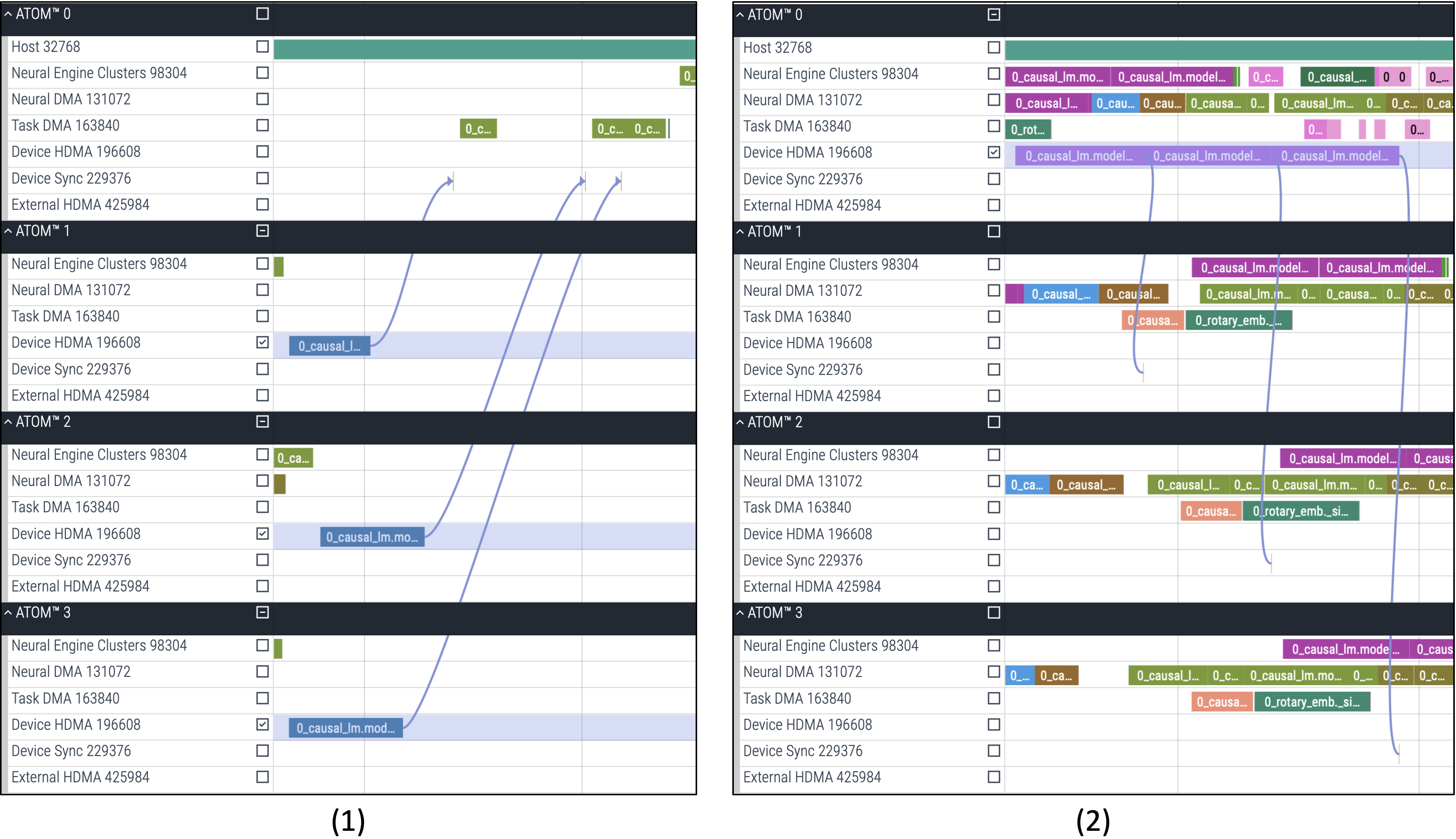
In large models using multiple devices, layers are divided through sharding, allowing them to run across multiple devices.
In case 1, the root device (node 0) synchronizes with the leaf devices (nodes 1, 2, 3) via
Device HDMAto receive data. Figure (1) illustrates how data are gathered into the root device (node 0) throughDevice HDMA, after which the synchronization on each leaf device (nodes 1, 2, 3) is released.Conversely, in case 2, the root device (node 0) also synchronizes with the leaf devices (nodes 1, 2, 3) via
Device HDMAto send data. Figure (2) illustrates how data are distributed to the leaf devices (nodes 1, 2, 3) throughDevice HDMA. Afterward, the leaf devices send a synchronization signal to confirm they have correctly received the data.For these tensor-parallel models, synchronization commands are generated during compilation to establish dependencies with the
Device HDMA.Note
ATOM™: The screenshots above are ATOM™ traces. Data transfers and synchronization between devices appear as
Device HDMAandDevice Synccommands.Rebel100™:
Device HDMAandDevice Synccommands appear inside eachChipletgroup. When the model uses collective communication (CCL), as in tensor-parallel serving with RBLN vLLM, communication between devices appears on theCCLtracks; see CCL Communication.
-
Understanding Chiplet, Workload, and CCL Tracks
A Rebel100™ trace groups commands by chiplet and provides the Device Workload and CCL tracks described in Trace Layout. This section explains how to read them. When you profile with RBLN vLLM, the per-rank traces show the asynchronous Device Workload windows and the CCL sections alongside the framework-level operations, which makes the tracks described below easier to follow; see Option 2: Using vllm-rbln for details.
Device Workload Matching
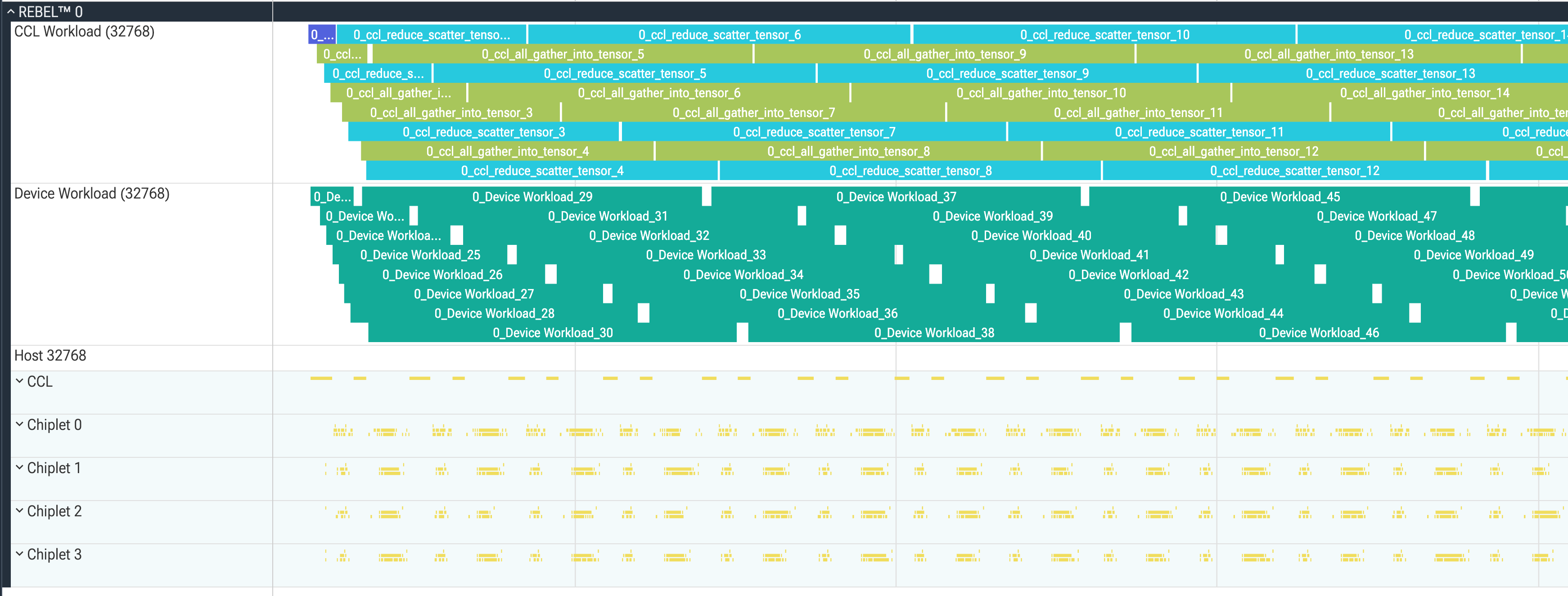
Slices on the Device Workload track are named {sequence_index}_Device Workload_{workload_index} (with the same i{instance_index}_ prefix as commands in the Multi Stream file), and each covers the device-side execution window of one runtime call. As in the image above, when consecutive runtime calls overlap, their Device Workload slices are stacked within the track.
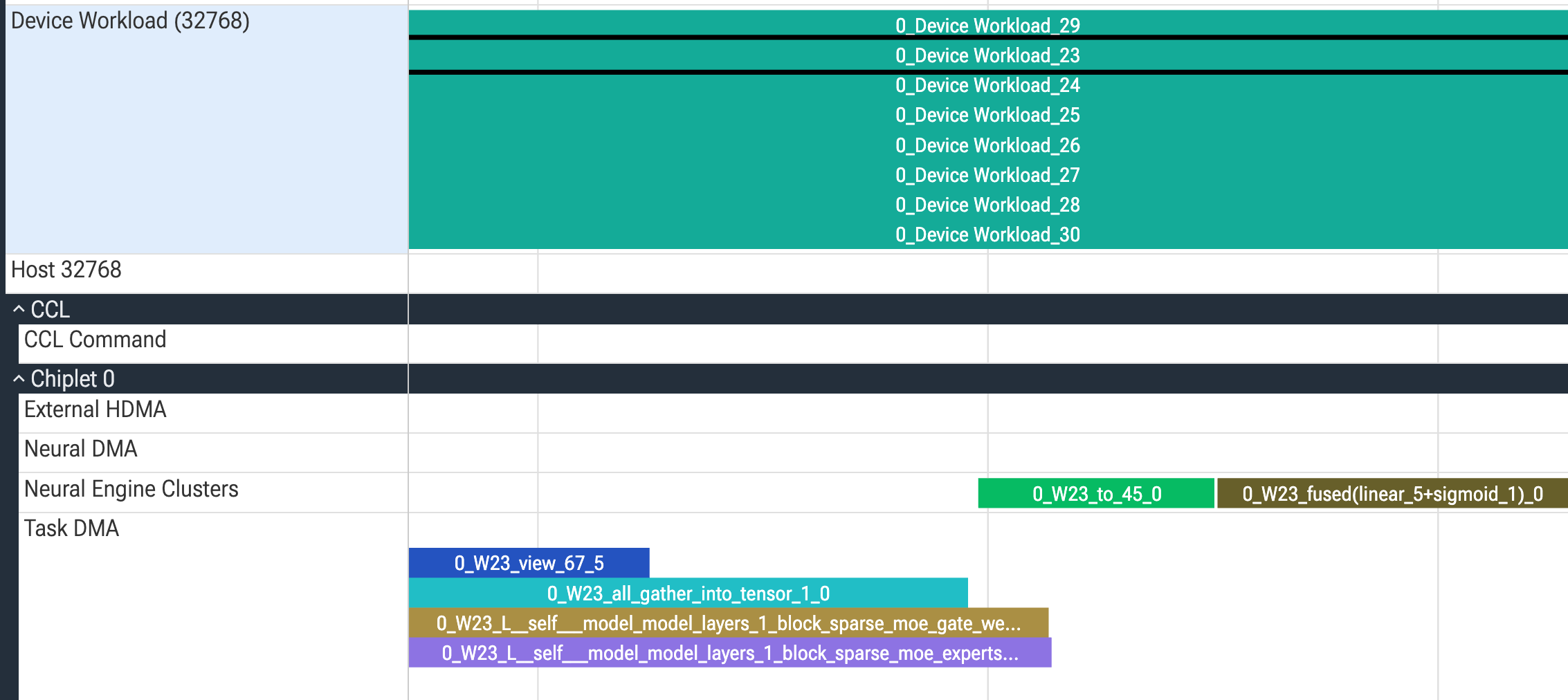
Commands that belong to a window carry the matching W{workload_index} token in their name, so search the trace for that token to list them. The image above shows Device Workload_23 selected, with the commands named 0_W23_… running on the Neural Engine Clusters and Task DMA tracks of Chiplet 0. Overlapping windows stay distinguishable because each command carries its own workload_index.
Chiplet Groups
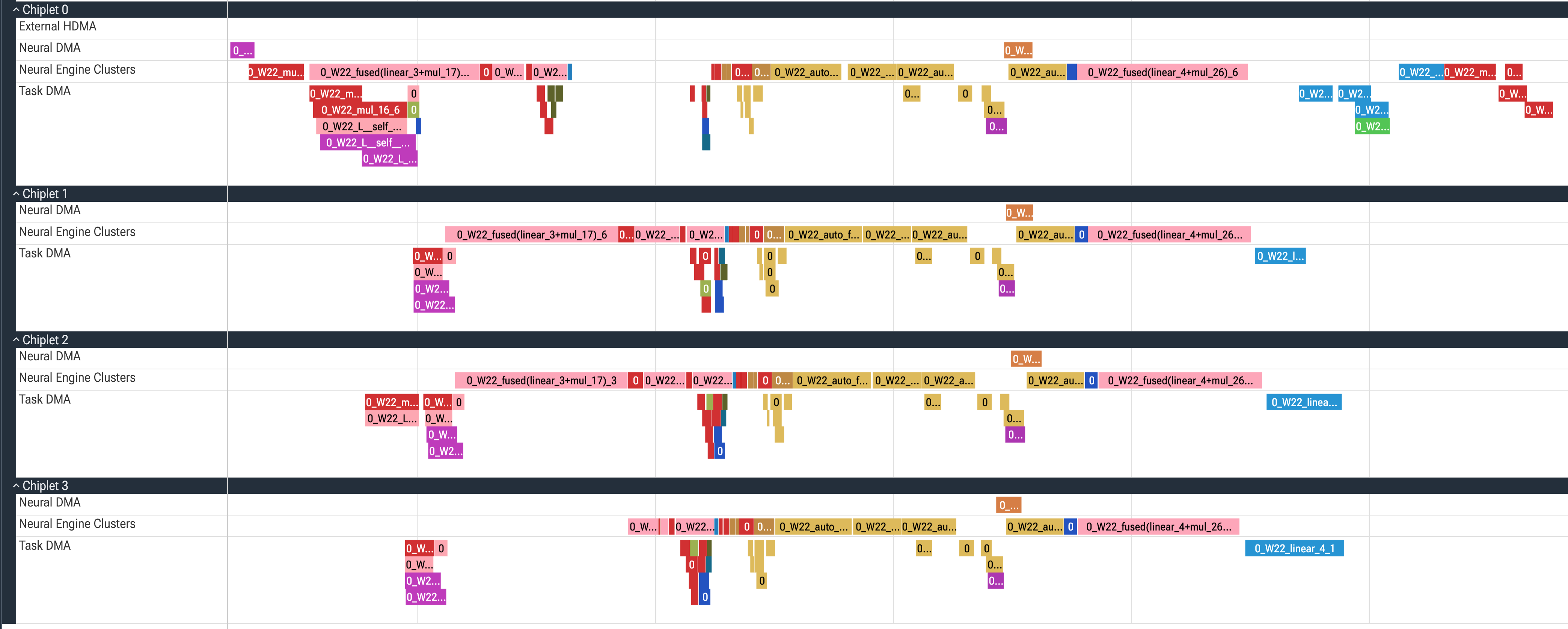
Commands are recorded under the Chiplet group of the chiplet that executed them, so that group is how the trace identifies where a command ran. A layer distributed across chiplets appears as commands with the same name under several Chiplet groups, and each of those slices is the part its chiplet executed. Rebel100™ comprises four chiplets, so Chiplet 0 through Chiplet 3 are all present; a group with no slices means that the chiplet executed no command of the profiled model.
Note
ATOM™ is a single-die SoC, so an ATOM™ trace has no Chiplet groups.
CCL Communication
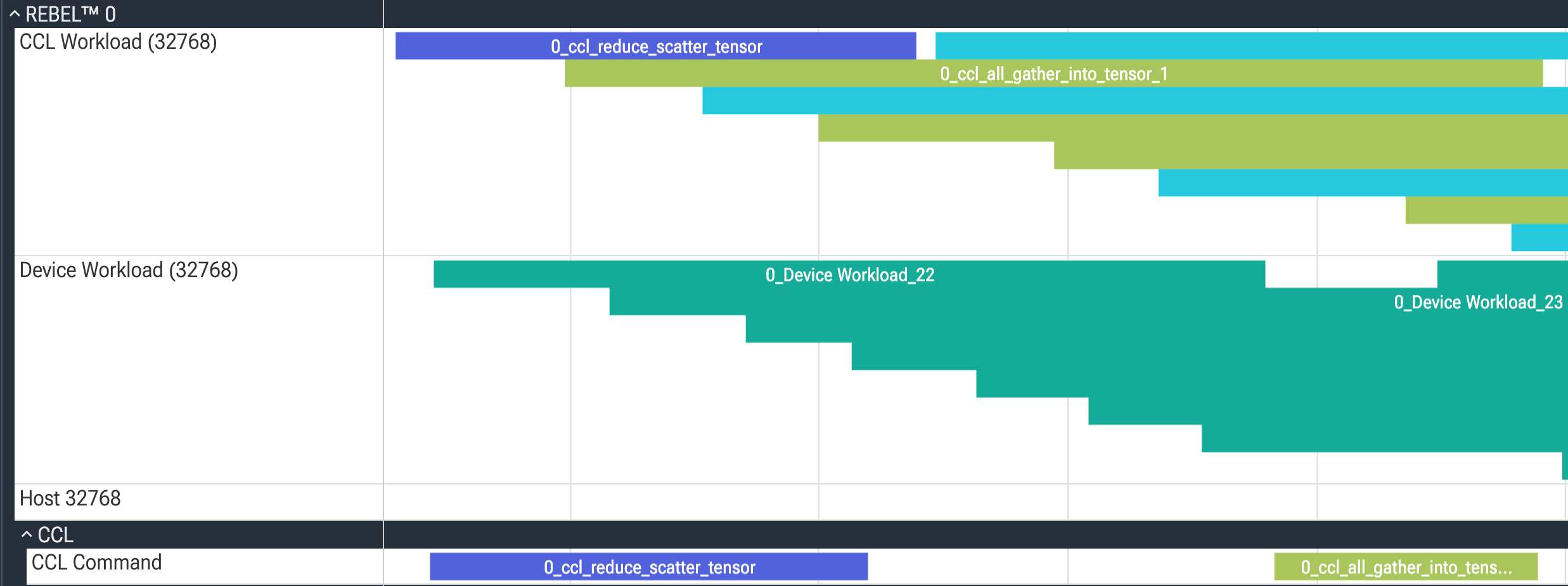
When a model runs across multiple Rebel100™ devices using collective communication (CCL), as in tensor-parallel serving with RBLN vLLM, the collective operations appear in the trace at two levels. A run without collective communication has no CCL tracks. The CCL Workload track at the device level holds one slice per collective, covering its whole execution window. Expanding the CCL group reveals the CCL Command track, where a slice with the same name covers only the portion in which the command stream of that collective is running.
Profiling Overhead

The Host track also contains Profile Wait, Profile Readback, and Profile Workload slices. The image above shows a Profile Readback slice. These slices measure the time the RBLN Profiler spent waiting for a runtime call to finish and reading its counters back from the device. Exclude these slices when you measure the latency of the model; they do not exist when profiling is disabled.
Naming Policy in Detail
Execution of a neural network can be represented as a sequence of tensor operations, and with the RBLN Compiler, each tensor operation can be represented as a sequence of commands. Therefore, a sequence of commands in a visualized profiling result can be mapped to a neural network module. This section introduces the naming policy of commands on the timeline.
Case 1. Matching Names with Model (PyTorch)
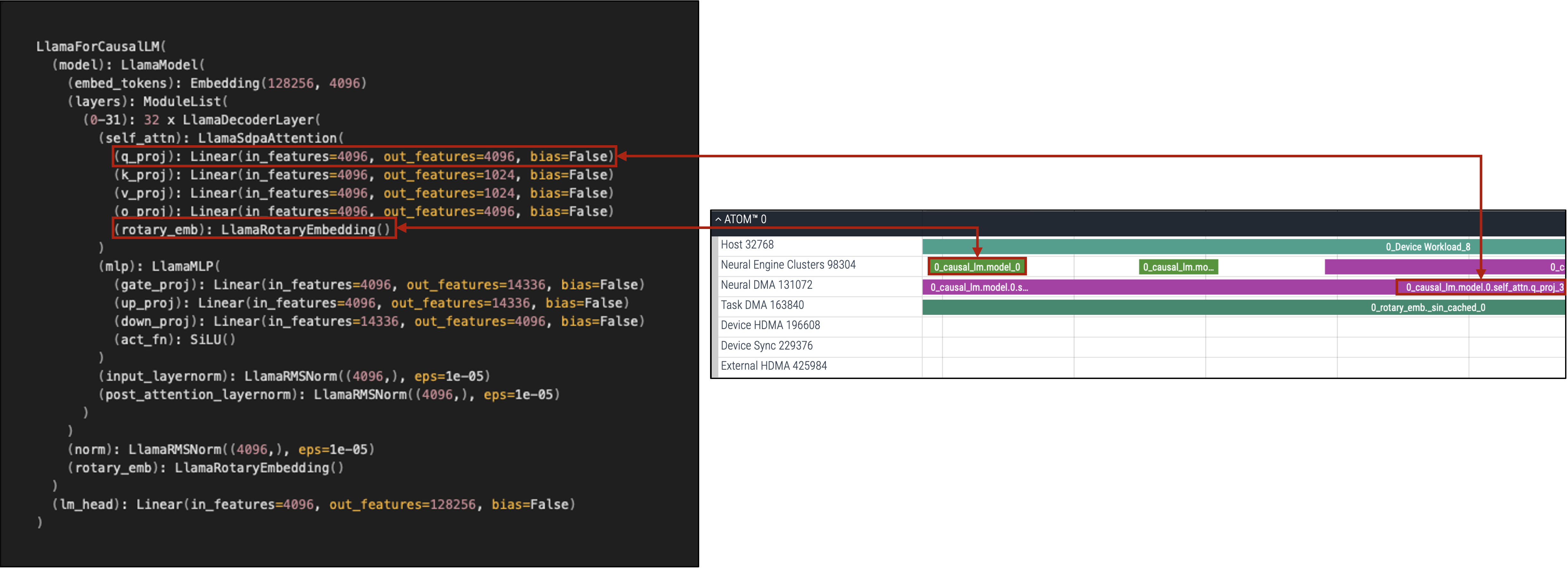
The structure of a model can be recognized from a printed specification or code-level implementation. Comparing that information with the visualized slices shows how an operation is converted into a sequence of commands. In the above example, model.layers[0].self_attn.q_proj of a LlamaForCausalLM instance gets converted into 0_causal_lm.model.0.self_attn.q_proj.
The structure of a model and the order of its layers may differ from the actual sequence in which commands are processed. Several commands can be omitted during compilation. In that case, command indices of a single layer can be noncontiguous. Additional commands are implicitly generated during the compilation process for executing various operations on the RBLN NPU efficiently. In the above example, 0_causal_lm.model_0 is added to process a rotary positional embedding layer (RoPE).
Case 2. Command Generation

To improve performance and efficiency, the RBLN Compiler supports operation fusion, which combines a sequence of operations into a single function. The command_name of a fused function is fused(name0+name1...). In the above example, a convolution layer, a batch normalization layer and an activation function layer are merged into a single function named fused(layer1.2+layer1.2.bn3+layer1.2.conv3).
A sequence of commands for processing a module shares the same command_name, and the command_index distinguishes each of them. Several commands for running fused(layer1.2+layer1.2.bn3+layer1.2.conv3), such as device memory accesses on Task DMA and executions on the Neural Engine Clusters, are expressed in the form 0_fused(layer1.2+layer1.2.bn3+layer1.2.conv3)_{command_index}.
Case 3. Reusing Layers (PyTorch)

Inline operations such as torch.add, torch.nn.functional.relu are compiled without name because the model does not have their attribute names. This makes it hard to identify which commands correspond to the operations in Perfetto. To prevent this, use an explicit class attribute inheriting torch.nn.Module instead of inline operations.
Additionally, repeatedly using a single class attribute may also create difficulties in mapping commands in Perfetto to specific operations. For example, in the ResNet50 model, as shown in the PyTorch code, the Bottleneck module has only one explicit ReLU attribute, self.relu, which holds an nn.ReLU instance. In this case, as seen in the profiling results above, relu is omitted from the command names of the second and third Neural Engine Clusters commands, because the same self.relu attribute is repeatedly used in the forward function. Only the first command retains relu.

If you modify the forward function in the Bottleneck module to use different attributes (self.relu1, self.relu2, self.relu3), as shown in the PyTorch code above, relu is explicitly included not only in the first Neural Engine Clusters command name (1) but also in subsequent ones (2) and (3), without being omitted.