RBLN System Management Daemon
Overview
RSMD (Rebellions System Management Daemon) monitors and controls RBLN NPU devices. It bridges kernel driver interfaces and provides a unified gRPC-based API surface for device management operations.
RSMD enables real-time monitoring of device health metrics including temperature, power consumption, memory usage, clock frequencies, and utilization. The daemon collects kernel events via netlink sockets and maintains event history and coredumps for diagnostic purposes. Device control operations such as resets, RSD group management, and runtime configuration changes are exposed through the gRPC interface.
The system provides a command-line interface (rbln-smdi) for interactive device management. RSMD operates as a systemd service, providing centralized management capabilities for multiple NPU devices in production environments, with mTLS and IP/CN-based access control to make remote operation safe.
RSMD supports both RBLN NPU product families. A device reports the family it belongs to as part of its identification. For the cards each release supports, see Support Matrix.
Architecture
RSMD follows a daemon–client model. A single rbln-smd process owns access to every NPU on the host and exposes them through one gRPC interface; the rbln-smdi CLI, remote clients, and automation connect to that interface rather than to the kernel directly. Centralizing access behind one endpoint keeps a continuous record of kernel events that on-demand tools would miss and places every remote operation behind a single mTLS and allowlist boundary.
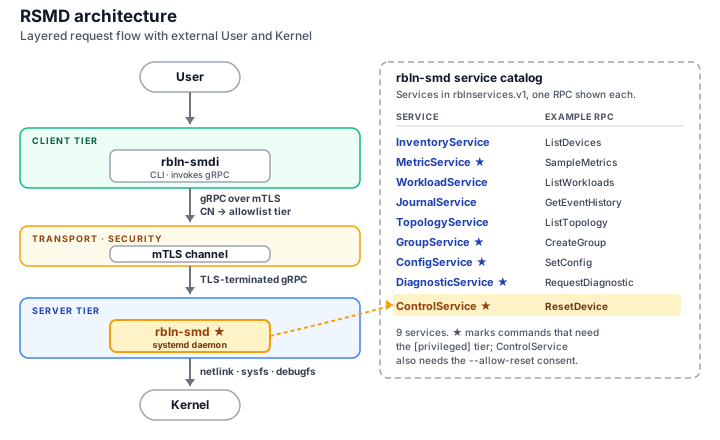
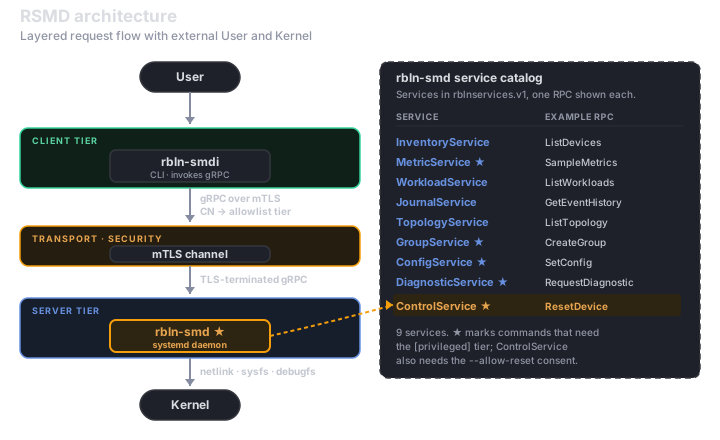
| Component | Role |
|---|---|
rbln-smd | Background daemon — collects kernel events, reads device telemetry, and executes device control, exposing all of it over gRPC. |
rbln-smdi | Command-line client — interactive queries and control, including connections to a daemon on a remote host. |
rbln_smd_v1.proto | gRPC contract — the service and message definitions clients use to generate language bindings. |
Core Components
Daemon (rbln-smd)
rbln-smd is the core daemon that runs continuously in the background, providing device management capabilities through a gRPC interface.
Deprecation
A binary-identical copy is also installed as rbln_daemon for backward compatibility with earlier configurations. This legacy name is scheduled for removal in v4.0; migrate scripts and tooling to rbln-smd.
Functionality
rbln-smd performs the following:
- Monitors kernel events via netlink sockets and persists them as CSV logs
- Exposes device telemetry (temperature, power, memory, clock, utilization) through the gRPC interface
- Reports which host processes and execution contexts currently occupy the NPUs
- Handles device control operations such as resets
- Manages RSD groups (creation and destruction)
- Runs on-demand hardware validation diagnostics
- Enforces mTLS and IP/CN-based access control
Features
- Operates as a systemd service (
rbln-smd.service) for automatic startup and lifecycle management - Supports both TCP (default port 50051) and Unix domain sockets for client connections
- Configurable event and coredump retention with automatic rotation
Configuration
The following environment variables control daemon behavior:
RBLN_SMD_URI: gRPC listen URI (default:[::]:50051). Supplies--uriwhen that flag is absent, so passing the flag overrides this variable. Takes precedence overRBLN_SMD_PORT. Accepts a Unix domain socket, for exampleunix:///var/run/rbln.sock.RBLN_SMD_PORT(default:50051): TCP port for the gRPC server. Ignored whenRBLN_SMD_URIis set.RSMD_TLS_CA_CERT/RSMD_TLS_SERVER_CERT/RSMD_TLS_SERVER_KEY: Certificate trio (CA certificate, server certificate, server private key). All three must be set together.RSMD_MAX_EVENTS_PER_DEV(default:1000): Maximum events retained per device. The oldest events are removed when the limit is reached.RSMD_MAX_COREDUMPS_PER_DEV(default:200): Maximum coredump directories retained per device. The oldest entries are removed when the limit is reached.RSMD_FWLOG_MAX_LINES_PER_CP(default:10000, range1-32768): Maximum firmware-log entries captured per Command Processor into a coredump. A higher value reaches further back into a wrapped ring, at the cost of a longer device read while the kernel driver is blocked during a reset.RSMD_LOG_LEVEL(default:6): Log verbosity.0-2off,3error,4-5warning,6info,7debug,8verbose.RSMD_REQUIRE_OPENAT2: Requireopenat2for certificate reads, so the daemon does not start on a kernel without it (before Linux 5.6). Unset, the daemon falls back to the older path check on such a kernel.RSMD_SKIP_CERT_DIR_PERM_CHECK: Skip the certificate ownership and permission check at startup. Set it only where the deployment enforces those permissions by other means.
Deprecation
RSMD_CERT_PATH designated a single certificate directory. It is mapped to the environment tier with a one-time warning and is scheduled for removal in v4.0; set the RSMD_TLS_* trio instead.
Command-line Flags
The daemon accepts the following flags (append to ExecStart= in the systemd unit, or override with systemctl edit):
--mtls: Enable mTLS mode.--allow-reset: Allow device reset calls. Without this flag, reset is always denied.--ca-cert <file>: CA certificate used to verify client certificates.--cert <file>: Server certificate.--key <file>: Server private key.-a, --allowlist <file>: Per-client access restriction file (IP / CN based).--uri <uri>: Alternate binding (e.g.,unix:///var/run/rbln.sock).--pid-file <path>: PID file path. Precedence: this flag, thenRBLN_SMD_PID_PATH, then/run/rbln-smd.pid.
--ca-cert, --cert, and --key form one tier and must be supplied together. See Access Control and mTLS for how the daemon picks a certificate tier and for the behavior of --mtls, --allow-reset, and -a, --allowlist.
Deprecation
Passing a directory to --cert selected the v3.2 directory mode, in which the daemon read fixed filenames from that directory. The directory form is detected at startup with a one-time warning and is scheduled for removal in v4.0; pass the --ca-cert / --cert / --key file trio instead.
Service Management
The daemon runs as a systemd service. Service status can be checked with:
Logs are available through the systemd journal:
The daemon can be configured to listen on a Unix domain socket instead of the TCP port by specifying the --uri option in the systemd service configuration. The two are mutually exclusive: with a Unix socket, no TCP listener is opened.
A Unix socket cannot be combined with mTLS or an allowlist
A Unix domain socket delegates access control to file permissions, so pairing it with --mtls or -a, --allowlist is a configuration error and the daemon refuses to start rather than letting one of the two be silently bypassed.
The daemon creates the socket world-accessible (mode 0777), so any local user can reach it. To restrict access, place the socket in a directory whose permissions limit who can traverse it.
Info
rbln-smd.service and rbln_daemon.service point to the same binary and are mutually excluded by systemd Conflicts=. If both units are enabled, only one runs.
Event Logs
Device events are stored in /var/log/rebellions/rsmd_<device>.event as CSV files. These logs contain:
- Event type and source
- Timestamps (UTC and kernel time)
- Event data and sub-values
Protobuf API
The protobuf API defines the gRPC service interface that all RSMD clients use. The schema is a language-agnostic interface definition, so clients can be generated in Python, C++, Go, Java, and other supported languages. By strictly defining data types, the API ensures data integrity and keeps the wire format compact.
The current API surface is version 1, defined in rbln_smd_v1.proto under the package rblnservices.v1. Services are split by concern, so a client depends only on the ones it uses.
Available Services
Each service, with the RPCs this page documents. The proto file is the authoritative, complete list.
| Service | Purpose | RPC methods |
|---|---|---|
InventoryService | Static device identification — values that do not change for the lifetime of a boot | ListDevices, GetVersion, GetHardware, GetMemorySpec |
MetricService | Dynamic measurements. A client declares the metrics it cares about as a group, then reads the group's latest values | ListSupportedMetrics, CreateMetricGroup, UpdateMetricGroup, DeleteMetricGroup, ListMetricGroups, SampleMetrics |
ControlService | Imperative device control — device recovery by reset | ResetDevice |
JournalService | Read-only retrieval of historical records: the event log and captured coredumps | GetEventHistory, ListCoredumps |
GroupService | RSD group management | ListGroups, CreateGroup, DeleteGroup |
TopologyService | Interconnect topology — NUMA node, CPU affinity, group membership, PCIe link | ListTopology |
ConfigService | Daemon runtime configuration, and the daemon's binding to the kernel driver | ListConfig, GetConfig, SetConfig, DetachDriver, AttachDriver |
DiagnosticService | On-demand hardware validation runs. Asynchronous — a run is started, then polled to completion | RequestDiagnostic, GetDiagnosticResult, CancelDiagnostic |
WorkloadService | Live occupancy: the host processes running on the NPUs and the execution contexts they hold | ListWorkloads, ListContexts |
Operation Types
Every RPC declares an operation type as a method option, so a client can reason about a method's effect without reading prose:
| Type | Meaning |
|---|---|
QUERY | Reads state. Does not mutate device or daemon state. |
COMMAND | Mutates device or daemon state. |
STREAM | A server-streaming read. |
Queries and streams are observational; commands are state-mutating. The daemon may require a stricter privilege tier for commands — see Access Control and mTLS.
Concurrency
Queries and streams never block and are never rejected for contention. Commands serialize against one another, and how widely a command serializes depends on what it touches. The table covers the commands this page documents; the proto file is the authoritative, complete list.
| Serialization scope | Commands | On conflict |
|---|---|---|
| One target device | ResetDevice | Resets of disjoint devices run concurrently. A second reset overlapping a device already resetting does not fail the call: the overlapping target is reported as an error in that entry of the response's results. |
| The group's member devices | CreateGroup, DeleteGroup | A conflict on a shared device is rejected with ABORTED. Deleting every group serializes daemon-wide instead. |
| Other metric-group changes | CreateMetricGroup, UpdateMetricGroup, DeleteMetricGroup | A concurrent metric-group change is rejected with ABORTED. These never contend with device commands or with queries. |
| The whole daemon | DetachDriver, AttachDriver, RequestDiagnostic | Any other concurrent command is rejected with ABORTED, except ResetDevice, which reports the conflict in its results as in the first row. |
| None | SetConfig, CancelDiagnostic | Never rejected for contention. |
For the other commands, a client issuing commands concurrently should read ABORTED as "the daemon is busy with a conflicting command, retry" rather than as a failure of the request itself.
Message Types
These types appear across requests and responses, independent of any one service:
| Type | Role |
|---|---|
DeviceRef | Stable handle to one device. |
GroupRef | Stable handle to one RSD group. |
MetricGroupRef | Stable handle to one metric group. The reserved id default names a preregistered group covering every device. |
DeviceFilter | Server-side device filter. Empty selects every device; when both selectors are supplied the server takes their intersection. |
ErrorDetail | Application-level error detail, empty on success. Transport-level failures arrive out of band through the native gRPC status instead. |
EntityStatus | Per-entity outcome expressing partial failure — carried in unreachable on list responses, and in results on batch commands. |
These are the entries a service returns:
| Type | Contents | Returned by |
|---|---|---|
DeviceInfo | Device identification | InventoryService |
MetricDescriptor | One entry of the metric catalog | MetricService |
MetricSample | One sampled reading | MetricService |
TopologyEntry | NUMA node, CPU affinity, RSD group, PCIe link speed / width | TopologyService |
GroupEntry | RSD group id, member devices, and a name derived from the id (not settable at creation) | GroupService |
CoredumpEntry | Coredump path and its timestamp | JournalService |
Protocol Definition
The protocol buffer definition files are typically installed in /opt/rebellions/etc/ or a similar system location. Client applications use them to generate language-specific bindings for gRPC communication with the daemon.
Earlier API surface (deprecated)
rbln_smd.proto, package rblnservices, defines the single RBLNServices service that preceded version 1, and rbln_services.proto is a copy of it under an older filename. Both are still installed and still served, so a client built against them keeps working. rbln_smd.proto is deprecated, and the rbln_services.proto alias is scheduled for removal in v4.0 — generate bindings from rbln_smd_v1.proto.
Its RPC methods:
| Method | Description | Returns |
|---|---|---|
getDeviceList | List all detected devices | Stream of Device |
getServiceableDeviceList | List devices ready for operations | Stream of Device |
resetDevice | Reset a specific device | StatusMsg |
resetAllDevice | Reset all devices in system | StatusMsg |
getVersion | Get firmware, driver, and SMC versions | VersionInfo |
getHWInfo | Get temperature and power consumption | HWInfo |
getMemoryInfo | Get total and used memory | MemoryInfo |
getClockInfo | Get device clock frequencies | ClockInfo |
getEventInfo | Get hardware events from kernel | Stream of EventInfo |
getTotalInfo | Get comprehensive device information | Stream of DeviceInfo |
getUtilization | Get NPU utilization percentage | UtilInfo |
RblnListTopology | Get device topology (NUMA, CPU affinity, RSD group, PCIe link) | RblnListTopologyResponse |
RblnListCoredumps | List coredump entries for devices | RblnListCoredumpsResponse |
RblnGetConfig | Get a runtime configuration value | RblnGetConfigResponse |
RblnSetConfig | Set a runtime configuration value | RblnSetConfigResponse |
RblnListGroups | List active RSD groups | RblnListGroupsResponse |
RblnCreateGroup | Create an RSD group with the specified devices | RblnGroupOpResponse |
RblnDestroyGroup | Destroy an RSD group by group ID (-1 destroys all) | RblnGroupOpResponse |
CLI (rbln-smdi)
The rbln-smdi command-line interface provides interactive access to RSMD functionality. The tool offers formatted table output for human-readable results, with optional JSON output for automation and scripting use cases. The CLI supports remote connections to daemon instances running on different hosts.
Common Options
Most subcommands accept:
--ip <address>: gRPC server IP (default:localhost)--port <number>: gRPC server port (overrides~/.rbln-smdi/config)--jsons: Output in JSON format instead of tables
Global flags appear before the subcommand:
--ca-cert <file>: CA certificate used to verify the server certificate.--cert <file>: Client certificate.--key <file>: Client private key.--uri <URI>: Daemon connection URI (e.g.,unix:///var/run/rbln.sock). Overrides--ipand--port.-V, --version: Print the CLI version.
--ca-cert, --cert, and --key form one tier and must be supplied together. See Access Control and mTLS for how the client picks a certificate tier.
Device and Group Filters
status, topo, journal, and ps accept the same two filter options:
-d <SPEC>: Device filter. Default: all devices.-g <SPEC>: RSD group filter. Ignored when-dis also specified.
-d accepts a device name, a range, a comma-separated list, a glob, or all:
| Form | Example | Selects |
|---|---|---|
| Name | rbln0 | One device |
| Range | rbln0..3 | rbln0 through rbln3, inclusive |
| List | rbln0,rbln2 | The listed devices |
| Glob | rbln3-* | The virtual functions of rbln3 |
| All | all | Every device |
-g accepts a group id, a range, or a comma-separated list — for example 1, 1..3, or 1,2.
A device named in the spec that is not present is reported as a warning and dropped, so a typo never silently widens the query to every device.
Environment Variables
RSMD_IF_CA_PATH/RSMD_IF_CERT_PATH/RSMD_IF_KEY_PATH: Certificate trio (CA certificate, client certificate, client private key). All three must be set together.RBLN_SMDI_VERBOSE: Set to1,true,yes, oronto print the resolved certificate tier and the three certificate paths tostderrat connection time. Off by default, sostderrstays clean for scripts.
Persistent Configuration
The file ~/.rbln-smdi/config accepts the following keys:
secure=true|false: Whether to use TLS (defaultfalse).port=<number>: Default port used when--portis not specified.ca_path=<file>/cert_path=<file>/key_path=<file>: Certificate trio. All three must be set together.
Info
See Access Control and mTLS for the full behavior of the security-related options.
CLI Examples
Summary
Lists all detected NPU devices with card name, PCI BDF, UUID, firmware versions, RSD group, and status.
Command
Output (example)
+-------------------------------------------------------------------------+
|                            Device Discovery                             |
+=====+======================================+============+======+========+
| NPU | Identifiers                          | FW Ver     | RSD  | Status |
+-----+--------------------------------------+------------+------+--------+
|   0 | rbln0                      RBLN-CA25 | CP:  3.4.0 | rsd0 | READY  |
|     | 0000:47:00.0                      PF | SMC: 3.4.0 |      |        |
|     | 00000000-0000-0000-0000-000000000001 |            |      |        |
+-----+--------------------------------------+------------+------+--------+
+-------------------------------------------------------------------------+
|                            Device Discovery                             |
+=====+======================================+============+======+========+
| NPU | Identifiers                          | FW Ver     | RSD  | Status |
+-----+--------------------------------------+------------+------+--------+
|   0 | rbln0                      RBLN-CR13 | CP:  3.5.1 | rsd0 | READY  |
|     | 0000:47:00.0                      PF | SMC: 3.5.1 |      |        |
|     | 00000000-0000-0000-0000-000000000001 |            |      |        |
+-----+--------------------------------------+------------+------+--------+
Summary
Displays temperature, power, memory usage, NPU utilization, and device status. Narrow the scope with -d or -g.
The Name column reports the product family the device belongs to, not its card model. Use discovery when the card model is what you need.
Command
Output (example)
+-----------------------------------------------------------------------------------------------------+
|                                            Device Status                                            |
+======+=====+======+========+=========+===========+======+==========+=============+=========+========+
| RSD  | NPU | Name | Device |   Temp  | Power(mW) | Perf | DNC(MHz) |    Memory   | Util(%) | Status |
+------+-----+------+--------+---------+-----------+------+----------+-------------+---------+--------+
| rsd0 |   0 | ATOM | rbln0  | 35.00 C | 55000.000 |  2   |   1000   | 2.5/15.7 GB |   12.5  | READY  |
+------+-----+------+--------+---------+-----------+------+----------+-------------+---------+--------+
+--------------------------------------------------------------------------------------------------------+
|                                             Device Status                                              |
+======+=====+=======+========+=========+============+======+==========+==============+=========+========+
| RSD  | NPU |  Name | Device |   Temp  | Power(mW)  | Perf | DNC(MHz) |    Memory    | Util(%) | Status |
+------+-----+-------+--------+---------+------------+------+----------+--------------+---------+--------+
| rsd0 |   0 | REBEL | rbln0  | 43.00 C | 100000.000 |  2   |   1400   | 2.5/140.0 GB |   12.5  | READY  |
+------+-----+-------+--------+---------+------------+------+----------+--------------+---------+--------+
Values in these captures are illustrative; the layout matches the tool's output.
Summary
Shows which host processes are running on the NPUs. The default view rolls execution contexts up to the owning process; --context lists the individual contexts instead. Read-only — it complements status, which reports the same host at device grain.
Command
Notes
A process spanning several NPUs produces one row per device. The identity columns print once per owning thread, so the rows under one TID belong to the same process. MEM is that process's hold on the device over the device's total capacity, and GUILTY in the per-context view marks a context the kernel driver held responsible for a device fault.
Output (example)
+------------------------------------------------------------------------------------------+
|                                        Workloads                                         |
+========+========+======+=========+========+=====+=====+==============+=========+=========+
|  PID   |  TID   | UID  |   NAME  | DEVICE | GRP | CTX |     MEM      | UTIL(%) | Running |
+--------+--------+------+---------+--------+-----+-----+--------------+---------+---------+
| 257082 | 257082 |    0 | python3 | rbln0  | 0   |   1 | 2.50/15.7 GB |    50.0 |   yes   |
|        |        |      |         | rbln1  | 0   |   1 | 2.50/15.7 GB |    48.0 |   yes   |
+--------+--------+------+---------+--------+-----+-----+--------------+---------+---------+
| 258431 | 258431 | 1000 | vllm    | rbln2  | 1   |   2 | 8.40/15.7 GB |    95.0 |   yes   |
+--------+--------+------+---------+--------+-----+-----+--------------+---------+---------+
+--------------------------------------------------------------------------------------------+
|                                          Contexts                                          |
+=======+=======+======+========+=========+======+==============+=========+=========+========+
|  DEV  |  CTX  | ASID |  TID   |   NAME  | PRIO |     MEM      | UTIL(%) | Running | GUILTY |
+-------+-------+------+--------+---------+------+--------------+---------+---------+--------+
| rbln0 | 10001 |    1 | 257082 | python3 |    0 | 2.50/15.7 GB |    50.0 |   yes   |   -    |
+-------+-------+------+--------+---------+------+--------------+---------+---------+--------+
| rbln1 | 10002 |    1 | 257082 | python3 |    0 | 2.50/15.7 GB |    48.0 |   yes   |   -    |
+-------+-------+------+--------+---------+------+--------------+---------+---------+--------+
Summary
Displays NUMA node, CPU affinity, RSD group, and PCIe link information.
Command
Output (example)
+----------------------------------------------------------------------------------------------+
|                                       Device Topology                                        |
+===========+=====+========+==============+===========+==============+============+============+
| RSD Group | NPU | Device |   PCI BDF    | NUMA Node | CPU Affinity | PCIe Speed | PCIe Width |
+-----------+-----+--------+--------------+-----------+--------------+------------+------------+
| rsd0      |   0 | rbln0  | 0000:47:00.0 |     0     | 0-63         |  16 GT/s   |    x16     |
+-----------+-----+--------+--------------+-----------+--------------+------------+------------+
Summary
Shows kernel event history and coredump entries together. Use --type to limit the output to one of them.
Command
Output (example)
+----------------------------------------------------------------------------------+
|                                      Events                                      |
+=====+==========+============+==============+==============+==========+===========+
| IDX | DEV NAME |    DATE    |     TIME     |    EVENT     | CATEGORY | SITUATION |
+-----+----------+------------+--------------+--------------+----------+-----------+
|  0  |  rbln0   | 2026-01-15 | 10:25:10.412 |   CP_EVENT   | DEV_ERR  |     -     |
|  1  |          |            | 10:25:12.118 |   COREDUMP   | DEV_ERR  |   RESET   |
|  2  |          |            | 10:25:14.902 | DEVICE_READY |    -     |     -     |
+-----+----------+------------+--------------+--------------+----------+-----------+

+---------------------------------------------------------------------------------------------------------+
|                                                Coredumps                                                |
+=====+==========+============+==========+===========+====================================================+
| IDX | DEV NAME |    DATE    |   TIME   | SITUATION |                        PATH                        |
+-----+----------+------------+----------+-----------+----------------------------------------------------+
|  0  |  rbln0   | 2026-01-15 | 10:25:12 |   RESET   | /var/log/rebellions/rbln0.20260115_102512.coredump |
+-----+----------+------------+----------+-----------+----------------------------------------------------+
Summary
Lists, creates, or destroys RSD groups. Use --attach with --create to name the member devices; it takes the same device selection as -d (see Device and Group Filters). --destroy all destroys every group.
Command
Output (example)
+------------------------------------------------+
|                   RSD Groups                   |
+==========+============+=========+==============+
| Group ID | Group Name | NPU IDs | Device Count |
+----------+------------+---------+--------------+
|    1     |    rsd1    |   0-1   |      2       |
+----------+------------+---------+--------------+
Summary
Reads and writes daemon-level state: the runtime configuration values, and the daemon's binding to the kernel driver. Configuration changes take effect immediately without a daemon restart.
With no arguments the command lists every key the daemon exposes, with its type, current value, built-in default, and the range --set accepts. The daemon owns that list, so a key it gains appears here without a CLI change.
Command
Notes
--get and --set take either the key name or the idx from the listing. A selector is a convenience for interactive use and is not stable across daemon versions, so a script should pass the key name. --set refuses a read-only key and a value outside the key's range, and, when the key is selected by idx, confirms with the value it moved from.
The daemon holds a reference to the kernel driver while it runs, which keeps the kernel module loaded. Detaching releases that reference so the module can be replaced without stopping the daemon; device operations are unavailable until it is re-attached.
Detaching drains in-flight work before it releases the reference, so it can take a moment. --timeout bounds that wait in seconds and defaults to 30 (0 means no bound); it is not enforced for --attach-driver. The reported state is one of ATTACHED, DETACHING, or DETACHED, and a failed call still reports the state the daemon observed — which distinguishes "stayed attached, retry" from "stuck detaching, extend the timeout."
Output (example)
+-----------------------------------------------------------------------+
|                             Daemon Config                             |
+=====+========================+======+===================+=============+
| idx |          key           | type | current [default] |    range    |
+-----+------------------------+------+-------------------+-------------+
| 1   | max_events_per_dev     | int  | 1000 [1000]       | 1 .. 100000 |
| 2   | max_coredumps_per_dev  | int  | 200 [200]         | 1 .. 10000  |
| 3   | fwlog_max_lines_per_cp | int  | 10000 [10000]     | 1 .. 32768  |
| 4   | log_level              | int  | 6 [6]             | 0 .. 8      |
+-----+------------------------+------+-------------------+-------------+
| -   | rsmd_version           | str  | 3.5.1             | read-only   |
| -   | kmd_version            | str  | 3.5.1             | read-only   |
| -   | umd_version            | str  | 3.5.1             | read-only   |
+-----+------------------------+------+-------------------+-------------+
idx selects a key for --get / --set in this listing. It is not stable across
daemon versions, so scripts should pass the key name.
+--------------------------+
|          Config          |
+--------------------------+
| max_events_per_dev: 1000 |
+--------------------------+
+--------------------------+
|     Config (updated)     |
+--------------------------+
| max_events_per_dev: 2000 |
+--------------------------+
Summary
Resets the selected devices, or every device in an RSD group. The daemon must be running with --allow-reset.
Match the reset unit to the workload. A workload submitted per device is recovered by resetting that device with -d; a workload submitted across an RSD group is recovered by resetting the whole group with -g.
Command
Notes
A reset is refused while the target still holds a live context. --force overrides that refusal.
Output (example)
On failure
Forcing a reset can deadlock a group workload
Forcing a per-device (-d) reset on an NPU that is still bound into a live RSD-group workload destroys that device's context while the group's peers keep waiting on it in the kernel driver. Reset the whole group with -g instead whenever the workload spans one, and reserve --force for a context that is genuinely wedged.
Deprecation
The reset subcommand (rbln-smdi reset rbln0, rbln-smdi reset all) is deprecated. Use device --reset instead. device --reset does not accept all: name the devices with -d, or reset a whole RSD group with -g.
Access Control and mTLS
This section covers the configuration needed to operate RSMD with mTLS and access control, split into daemon-side and client-side settings. Both sides must be configured consistently for the secure channel to come up.
Check the current mode
Daemon (rbln-smd) Configuration
rbln-smd configures transport security and access control with three independent flags plus a certificate trio. Specify them in the systemd unit or as CLI options when starting the daemon.
Access Control Flags
| Flag | Purpose |
|---|---|
--mtls | Enable mTLS mode. Opens a TLS-only channel on the listen address — RBLN_SMD_PORT, or the TCP address given by --uri / RBLN_SMD_URI. Without this flag, an insecure channel is opened. |
--allow-reset | Allow device reset calls (ControlService.ResetDevice, and resetDevice / resetAllDevice on the legacy API). Without this flag, reset calls are always denied. |
--allowlist <path> | 2-tier allowlist file. Restricts which clients may access the daemon and which may call state-changing commands, reset included. |
Operating Modes
| Mode | Flags | Behavior |
|---|---|---|
| Monitoring only (default) | (none) | Insecure channel, reset denied |
| Insecure + reset | --allow-reset | Insecure channel, any client may reset |
| mTLS monitoring | --mtls | TLS-only channel, reset denied |
| mTLS + reset | --mtls --allow-reset | TLS-only channel, any mTLS client may reset |
| Restricted access | --allow-reset -a /path/to/allowlist | Allowlisted clients only; privileged tier may reset |
Warning
With --mtls alone, any client presenting a valid certificate signed by the trusted CA can access all APIs except reset. To restrict per-client access, combine --mtls with --allowlist.
Allowlist
The allowlist is an INI-style file with [basic] and [privileged] sections. When the specified file does not exist, the daemon creates a template with guidance comments.
On the v1 API, [basic] covers queries and streams, and every command requires [privileged]; ResetDevice also requires --allow-reset. The legacy API restricts only reset to [privileged].
Supported entry types:
- IPv4 address:
192.168.1.100 - IPv4 CIDR:
192.168.10.0/24 - IPv6 address:
::1 - IPv6 CIDR:
fe80::/10 - CN string:
client-service-name(evaluated only on mTLS channels)
Channel rules:
- Insecure channel: Only IP / CIDR entries are evaluated.
-
mTLS channel: Entries are evaluated in this order, and the first matching step decides the result:
- CN listed in
[privileged]→ privileged - CN listed in
[basic]→ basic - IP / CIDR matches
[privileged]→ privileged - IP / CIDR matches
[basic]→ basic - No match → denied
When a client is registered under both CN and IP, the earlier step wins. For example, a client whose CN appears in
[basic]while its IP appears in[privileged]resolves to basic. - CN listed in
The allowlist file is checked for modifications via mtime on each gRPC request. Changes take effect on the next request without restarting the daemon. Entities that do not appear in any section are denied all access, including monitoring APIs.
Server Certificates
With --mtls enabled, the daemon needs three components: a CA certificate to verify client certificates, its own server certificate, and the matching private key.
The three are resolved as one tier — all three come from the same source. The daemon takes the first complete tier:
- CLI:
--ca-cert,--cert,--key - Environment:
RSMD_TLS_CA_CERT,RSMD_TLS_SERVER_CERT,RSMD_TLS_SERVER_KEY - OS default directories: the daemon searches for known filenames, splitting public certificates from the private key per the Linux PKI convention
Mixing tiers, or setting only one or two components of a tier, is rejected when the daemon starts rather than at the first connection, and the diagnostic names the missing component. Certificates are resolved only when --mtls is set; insecure mode does not require them.
For the third tier, the directories are:
| Component | Debian / Ubuntu | RHEL / CentOS / Fedora |
|---|---|---|
| CA certificate, server certificate | /etc/ssl/certs/ | /etc/pki/tls/certs/ |
| Server private key | /etc/ssl/private/ | /etc/pki/tls/private/ |
Within those directories the daemon takes the first filename that exists, in this order:
| Component | Filename candidates |
|---|---|
| CA certificate | ca.crt, rsmd_ca.crt, ca.pem |
| Server certificate | tls.crt, server.crt, rsmd_server.crt |
| Server private key | tls.key, server.key, rsmd_server.key |
Restrict the private key so users other than the daemon cannot read it (for example, the daemon's user account with mode 0600).
At startup the daemon also checks each certificate file and the directory that holds it: both must be owned by root or by the daemon's user, and neither may be group- or other-writable. If the check fails, the daemon does not start. Set RSMD_SKIP_CERT_DIR_PERM_CHECK=1 to skip the check where the deployment enforces these permissions by other means, such as a read-only mount.
A symbolic link is accepted as long as it resolves within the certificate directory — on the same mount point and under that directory. A link pointing outside it is refused. This keeps the indirect layout that Kubernetes presents for a mounted certificate Secret working.
On Linux 5.6 and later the daemon reads the trio through openat2, which applies a stricter rule: it refuses an absolute link even when its target sits inside the directory. Write in-directory links as relative ones — the Kubernetes layout already does. On a kernel without openat2 the daemon falls back to a path check that does not draw that distinction, and an absolute in-directory link loads. Set RSMD_REQUIRE_OPENAT2=1 to require openat2; the daemon then does not start on such a kernel.
Client (rbln-smdi) Configuration
rbln-smdi decides whether to connect to the daemon over an mTLS channel and which certificate to present. When the daemon runs with --mtls, the client must also enable TLS.
TLS Activation
The client needs three components: a CA certificate to verify the server certificate, its own client certificate, and the matching private key. As on the daemon side, the three are resolved as one tier, and the first complete tier wins:
- CLI:
--ca-cert,--cert,--key— applies to the current invocation. - Environment:
RSMD_IF_CA_PATH,RSMD_IF_CERT_PATH,RSMD_IF_KEY_PATH— applies per shell session. - Config file: the
ca_path,cert_path, andkey_pathkeys in~/.rbln-smdi/config, used whensecure=true— a persistent setting that applies to every subsequent invocation.
Mixing tiers is rejected when the client starts. A partly-filled tier is not always rejected, though: three older forms are still accepted and resolved into the CLI tier, each with a one-time warning. When TLS is off — secure=false and no certificate flag or variable is set — the client connects over the insecure channel. When TLS is on but no tier is complete, the client exits with an error at startup rather than falling back to the insecure channel.
Deprecation
These three forms are scheduled for removal in v4.0.
--tls <path>: the v3.2 single-flag form. The key and CA are inferred from the certificate's name and directory.RSMD_IF_CERT_PATHon its own, without the other two variables of its trio.RSMD_CERT_PATH: the v3.2 single-directory variable.
Move to --ca-cert / --cert / --key, or to the full RSMD_IF_* trio.
Set RBLN_SMDI_VERBOSE=1 to have the client print which tier it resolved and the three paths it uses to stderr, which is the quickest way to tell a config-file certificate from an environment one.
Client Certificates
When per-client access control is required, register the CN of the client certificate in the server-side allowlist.
A symbolic link is accepted under the same rule as on the daemon side, including the openat2 caveat: it must resolve within the certificate directory, and on a kernel that provides openat2 it must also be relative.
Before it connects, the client applies the same ownership and write-permission check to its own certificates, with the client's user in place of the daemon's. RSMD_SKIP_CERT_DIR_PERM_CHECK skips it on this side too.
Certificate Renewal
When the server certificate and key are overwritten in place, systemctl reload rbln-smd (SIGHUP) applies them without a restart: live connections keep their session, and new connections use the new certificate. If the reload fails, the daemon keeps the previous certificate and systemctl reload still succeeds, so check journalctl -u rbln-smd for TLS certificate reloaded. Replacing the CA certificate still requires a daemon restart. The client side picks up the new certificate on the next call.
When moving to new paths, update the server's certificate tier — the --ca-cert / --cert / --key flags or the RSMD_TLS_* variables — and restart the daemon. On the client, update the RSMD_IF_* variables or the ca_path / cert_path / key_path values in the config.
Renewing only the client-side certificate requires no daemon restart.
Telemetry Units
MetricService declares each measurement's unit in the metric identifier itself — METRIC_ID_TEMPERATURE_MILLI_CELSIUS, for instance — so a client reads the unit off the identifier rather than inferring it.
The units below are what a SampleMetrics response carries:
| Metric | Unit the identifier declares | A response value |
|---|---|---|
| Temperature | milli-degree Celsius (m°C) | 45 °C arrives as 45000 |
| Power | microwatt (µW) | 100.5 mW arrives as 100500 |
| Utilization | milli-percent | 50 % arrives as 50000 |
| Memory used | byte | 15.7 GiB arrives as 16877879296 |
| Clock frequency | MHz | 1 GHz arrives as 1000 |
| Performance state | ordinal, 0 being the highest-performance state | — |
rbln-smdi converts these before printing them, so its tables show °C, mW (Power(mW)), and percent rather than the values above. A client calling the API directly receives them unconverted.
Recommendations
- Regular monitoring: Run scheduled checks to track device health metrics over time.
- Event and coredump retention: Tune
RSMD_MAX_EVENTS_PER_DEVandRSMD_MAX_COREDUMPS_PER_DEVto match available disk space. - Network security: Prefer Unix domain sockets for local access, placed in a directory with restricted permissions since the socket itself is world-accessible; for remote access, combine
--mtlswith--allowlist. Restrict the TCP port further with firewall rules. - Error handling: Check the
errordetail in an API response before consuming its results, and inspectunreachable(list responses) orresults(batch commands) for entities the call could not cover. - Log review: Periodically review event logs to identify anomalies and recurring patterns.
References
- gRPC Definition:
rbln_smd_v1.protois typically located in/opt/rebellions/etc/or a similar system configuration directory. - Systemd Service: The service unit file is installed at
/etc/systemd/system/rbln-smd.service. A compatibility alias/etc/systemd/system/rbln_daemon.serviceruns a binary-identical copy of the same daemon (scheduled for removal in v4.0).