RBLN SDK for System Administrators
This guide is for system administrators who deploy and operate RBLN NPU servers in production environments. It covers the stages from installing the driver on a host to operating, monitoring, and maintaining the RBLN NPU family in cloud-native AI environments.
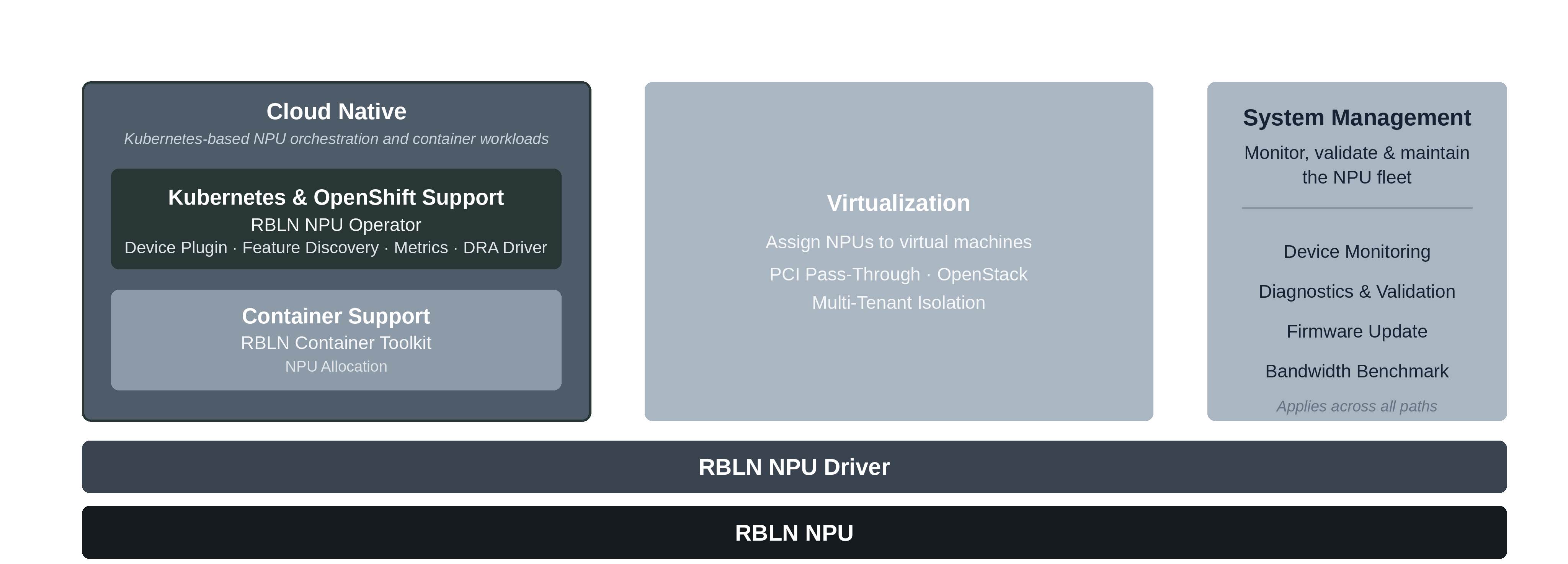
RBLN NPUs can be used on bare metal, in containers, on Kubernetes, and in virtualized environments, and components are provided for provisioning and operating the NPUs in each environment. The components you work with most as a system administrator are:
- RBLN Driver - installs the kernel driver and firmware on the host so the OS recognizes the NPUs
- Container Support - allocates NPUs to containers and injects the runtime libraries with the RBLN Container Toolkit
- RBLN NPU Operator - deploys NPU software and manages its lifecycle on Kubernetes and OpenShift clusters
- Virtualization Support - assigns NPUs to virtual machines with PCI Pass-Through. It also includes the environment configuration for OpenStack, a virtualization platform
- System Management - monitors, validates, and maintains the NPU fleet with the System Management Daemon and management tools. Provides device monitoring, diagnostics, firmware updates, and bandwidth benchmarking, and applies to both virtualized and bare-metal environments.
The following diagram shows the components that support container, Kubernetes and OpenShift, and virtualized environments on top of the RBLN NPU driver, and the system management area that applies across all of them.
Get Started
For quick access to the system-administration sections of the RBLN SDK, refer to the following links. If you have any questions or feedback, please contact us.
-
Bare Metal
-
Container Support
-
 RBLN NPU Operator
- About the Operator
- Tutorials
- Run an NPU Pod
- Allocate NPUs:
- Manage drivers:
- Configure VM nodes:
- Collect NPU metrics with Prometheus
- Installation:
- Upgrade
- Uninstallation
- Driver Management:
- NPU Allocation:
- Monitoring:
- Advanced Configuration:
- Sandboxed Workloads (KubeVirt)
- RDS Support
- Reference:
-
 System Management
 -
 Virtualization
- Overview
- Virtualization Methods:
- Platforms:
-

 Partner Solutions
- Red Hat AI Enterprise:
- Overview
- Installation
- Model Deployment:
- Red Hat AI Enterprise:
-
 Supports